Instant Connection for Pixel Streaming
— New Feature Automated Setup

Best Digital Twin Platforms & Software (2026)
-
Best Digital Twin Platforms & Software (2026)
Best Digital Twin Platforms & Software (2026)
-
Table of Contents
For teams that need to deliver a high-fidelity, interactive 3D digital twin through the browser, Vagon Streams is the best overall delivery and streaming solution to evaluate. It supports cloud-based application streaming, Unreal Engine Pixel Streaming, and Unity Render Streaming, allowing users to access demanding 3D experiences without installing software or relying on high-end local hardware.
That recommendation applies specifically to the delivery layer. Vagon Streams is not a complete IoT platform, asset management system, BIM or GIS platform, simulation engine, or enterprise digital twin data model. Your team still needs to create the digital twin, connect real-world data where required, build the interactive application, and manage the operational systems behind it.
This distinction matters because digital twin platforms and software solve different parts of the problem. Some connect sensors and operational data. Others manage BIM, GIS, engineering models, simulations, or asset information. A cloud streaming platform handles another requirement: making an interactive, high-quality 3D digital twin accessible to users across browsers and devices.
What Is A Digital twin?
A digital twin is a digital representation of a real-world object, system, environment, or process. It may combine a 3D model with sensor data, operational information, simulations, historical records, and user interaction.
The exact definition varies across industries. The NIST digital twin definition describes a digital twin as a digital representation of a physical or perceived real-world entity. NIST also describes digital twins as computer models that can support monitoring, simulation, optimization, forecasting, and decision-making.
A digital twin is more than a static 3D model.
A 3D model represents the shape or appearance of something. It may be highly detailed, but it does not necessarily know the current state of the physical object.
A digital twin can connect that model to information about the real-world system. For example, a factory twin might show the location of machines, production zones, operating states, maintenance information, or live sensor values. A building twin might combine geometry, occupancy, energy data, equipment status, and environmental conditions.
A simulation models possible behavior or future scenarios. It may be part of a digital twin, but a simulation does not automatically become a digital twin simply because it uses 3D graphics.
An IoT or industrial data platform collects, processes, and manages information from sensors and connected equipment. It may power a digital twin without providing the main 3D interface.
A real-time 3D application presents the environment visually and lets users interact with it. It might be built with Unreal Engine, Unity, or another technology.
A cloud streaming platform delivers that application to users through a browser. This is where Vagon Streams fits.
What Does A Complete Digital Twin System Include?
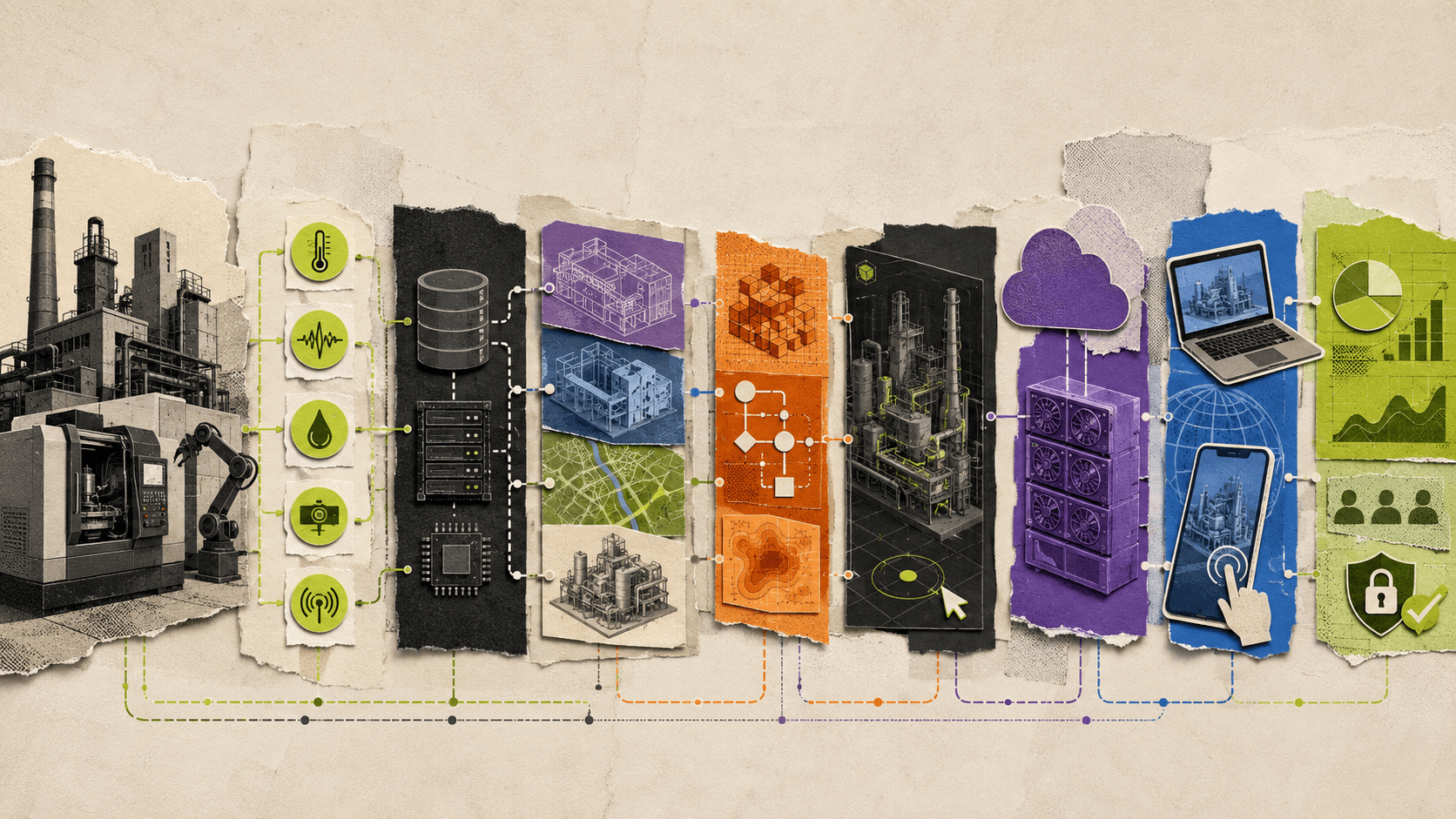
A complete digital twin system usually contains several connected layers. The exact architecture depends on the industry and the purpose of the twin.
At the physical layer, there is an asset, building, machine, vehicle, factory, warehouse, infrastructure network, or process being represented.
At the data layer, the system may receive information from sensors, industrial equipment, operational software, maintenance systems, databases, cameras, or external services.
At the model layer, the team may use a CAD model, BIM model, GIS data, photogrammetry, a game engine scene, or a combination of several sources.
At the logic layer, rules, simulations, physics systems, machine learning models, or operational workflows may determine how the digital twin behaves.
At the interaction layer, users may inspect objects, change views, trigger animations, compare states, simulate scenarios, or access operational information.
At the delivery layer, the experience may be provided through a desktop application, local browser rendering, virtual reality, mobile applications, or cloud streaming.
Finally, security, identity, permissions, monitoring, analytics, and governance determine who can access the system and how it is managed.
Not every project needs all of these layers. A marketing-focused product twin may not require real-time sensor data. A factory operations twin may need extensive industrial connectivity but only a simple 3D interface. A real estate twin may focus on spatial visualization, building data, and remote collaboration.
This is why comparing digital twin platforms requires more than looking at a feature list. The right platform depends on the problem the team needs to solve.
Best Digital Twin Platforms And Software Categories Compared
Digital twin software is not one unified product category. The following solution types often work together as part of a larger architecture.
Solution category | Best for | 3D visualization | Real-time data | Simulation | Browser delivery | Implementation effort |
|---|---|---|---|---|---|---|
Industrial IoT and asset intelligence platforms | Sensors, machines, monitoring, and asset data | Low to medium | Strong | Medium | Varies | High |
Enterprise digital twin platforms | Connected assets, processes, and business systems | Medium | Strong | Medium to high | Often available | High |
BIM and construction platforms | Buildings, infrastructure, coordination, and facilities | Strong for built environments | Medium | Medium | Usually available | Medium to high |
Engineering simulation software | Physics, design validation, and scenario testing | Medium to high | Usually limited without integration | Strong | Varies | High |
3D engines and visualization tools | Interactive environments and visual applications | Very high | Requires integration | Strong | Requires deployment layer | Medium to high |
WebGL delivery | Lightweight browser-based 3D experiences | Low to high, depending on optimization | Requires integration | Limited to medium | Strong | Medium |
Cloud and pixel streaming platforms | High-fidelity interactive 3D delivery | High | Requires integration | Depends on the application | Strong | Medium |
Industrial IoT and asset intelligence platforms
Industrial IoT platforms focus on collecting and managing data from machines, sensors, equipment, and operational environments.
They may include device management, data ingestion, dashboards, alerts, asset hierarchies, rules, workflow automation, and predictive maintenance features. These capabilities are important for a factory, power plant, warehouse, or connected infrastructure project.
Their primary strength is data and operations, not necessarily high-fidelity interactive 3D. A company may use an industrial IoT platform as the data source and a separate real-time 3D application as the visual interface.
This category is often the right starting point when the main goal is monitoring equipment, tracking performance, detecting faults, or managing industrial data.
Enterprise digital twin platforms
Enterprise digital twin platforms attempt to connect assets, processes, operational data, simulations, users, and business systems in one environment.
They may support asset hierarchies, digital thread workflows, data integration, dashboards, 3D visualization, collaboration, and lifecycle management. These platforms are useful when many departments need to work with the same source of information.
The trade-off is implementation complexity. Enterprise digital twin projects may require data modeling, integration work, governance, permissions, training, and long-term maintenance.
An enterprise platform may be a stronger choice than a streaming platform when the core need is managing operational data across a large organization. It may still use a separate 3D delivery layer when users need high-fidelity real-time visualization.
BIM and construction platforms
BIM platforms are designed for buildings, infrastructure, construction coordination, facility management, and the built environment.
They can manage building models, project information, collaboration, clash detection, construction planning, documentation, and lifecycle data. Some support interactive 3D views and browser-based collaboration.
BIM is not interchangeable with digital twin software. A BIM model may describe a building before or during construction, while a building digital twin may include operational data, occupancy, energy usage, equipment status, maintenance information, and live conditions after the building is in use.
For architecture, real estate, and construction teams, BIM may be the core source of geometry and project information. A separate real-time application or streaming platform can provide a more immersive experience for remote reviews, sales presentations, or public-facing visualization.
Engineering simulation software
Simulation tools focus on modeling physical behavior, testing scenarios, and validating design decisions.
They may support computational fluid dynamics, structural analysis, manufacturing processes, robotics, vehicle behavior, energy systems, or other engineering domains. Their strength is numerical analysis and technical accuracy.
A simulation can become part of a digital twin system, but it is not the same as the entire digital twin. Teams may need to connect the simulation with real-world data, a 3D visualization layer, and an operational workflow.
3D engines and visualization tools
Real-time engines such as Unreal Engine and Unity can power interactive digital twin applications. They support rendering, lighting, materials, animation, physics, user interaction, and custom application logic.
These tools are often used to build the visual and interactive layer of a digital twin. They do not automatically provide sensor connectivity, enterprise asset management, predictive maintenance, or product data governance.
A team may build a factory twin in Unity, connect it to a separate data service, and deliver it through a cloud streaming platform. Another team may create a building visualization in Unreal Engine and use it for remote walkthroughs, training, or sales.
WebGL delivery
WebGL renders the digital twin directly in the browser. This can provide convenient access and may work well for lightweight or optimized environments.
The main challenge is device performance. Detailed geometry, large textures, complex lighting, and advanced interaction can exceed the capabilities of some customer devices.
The team must also manage browser compatibility, asset optimization, download sizes, mobile performance, and local GPU variation. The cloud streaming versus WebGL comparison explains this trade-off in more detail.
Cloud and pixel streaming
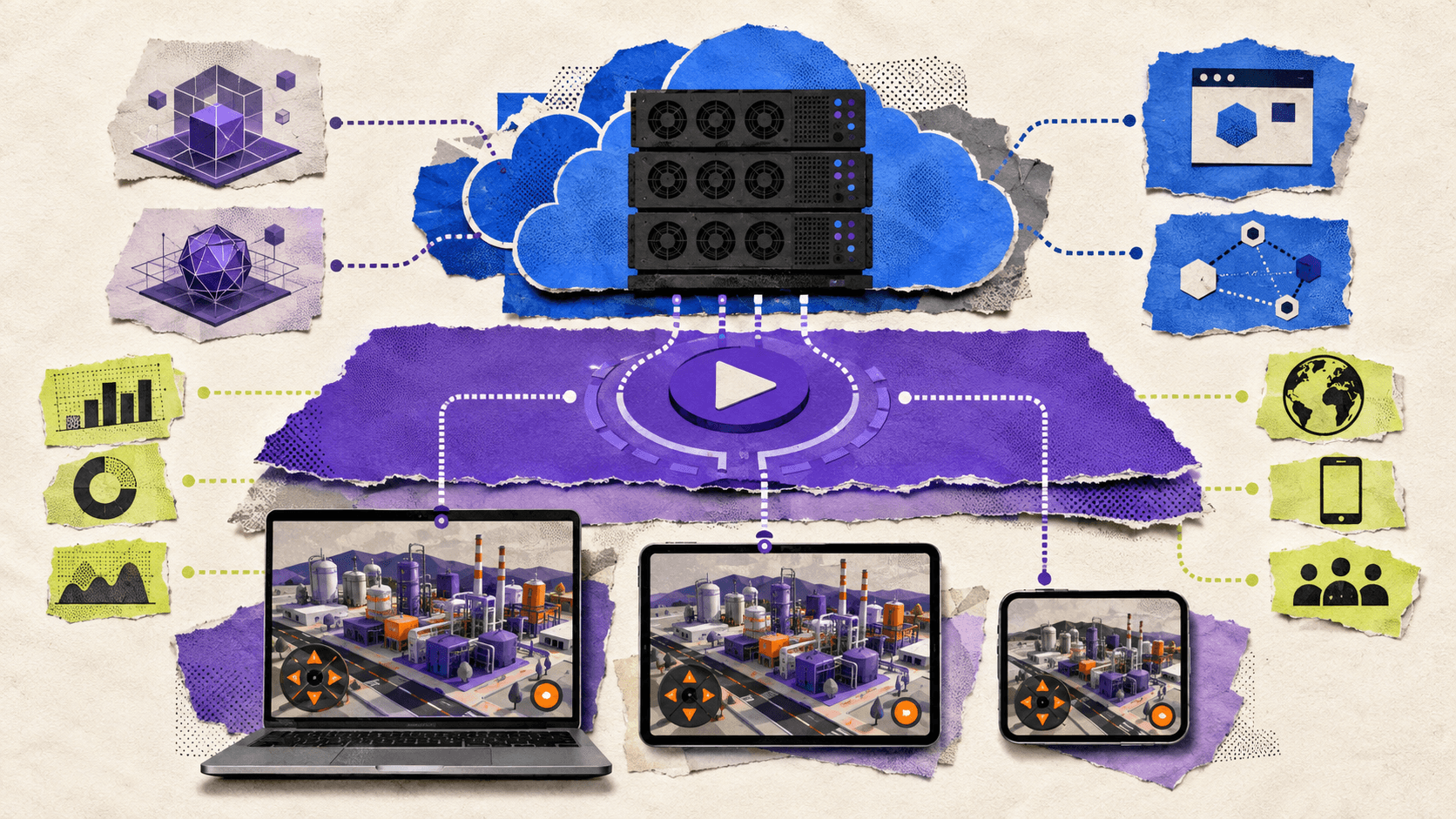
Cloud and pixel streaming platforms run the application on remote GPU infrastructure and send the visual result to the user’s browser.
This approach is useful for high-fidelity digital twins that are difficult to render locally. It can support detailed factories, warehouses, buildings, products, vehicles, and infrastructure environments without requiring every user to install an application or own a powerful workstation.
The delivery platform does not automatically create the digital twin. It provides the infrastructure and access layer for an application that your team has already built or prepared.
What Should You Look For In Digital Twin Software?
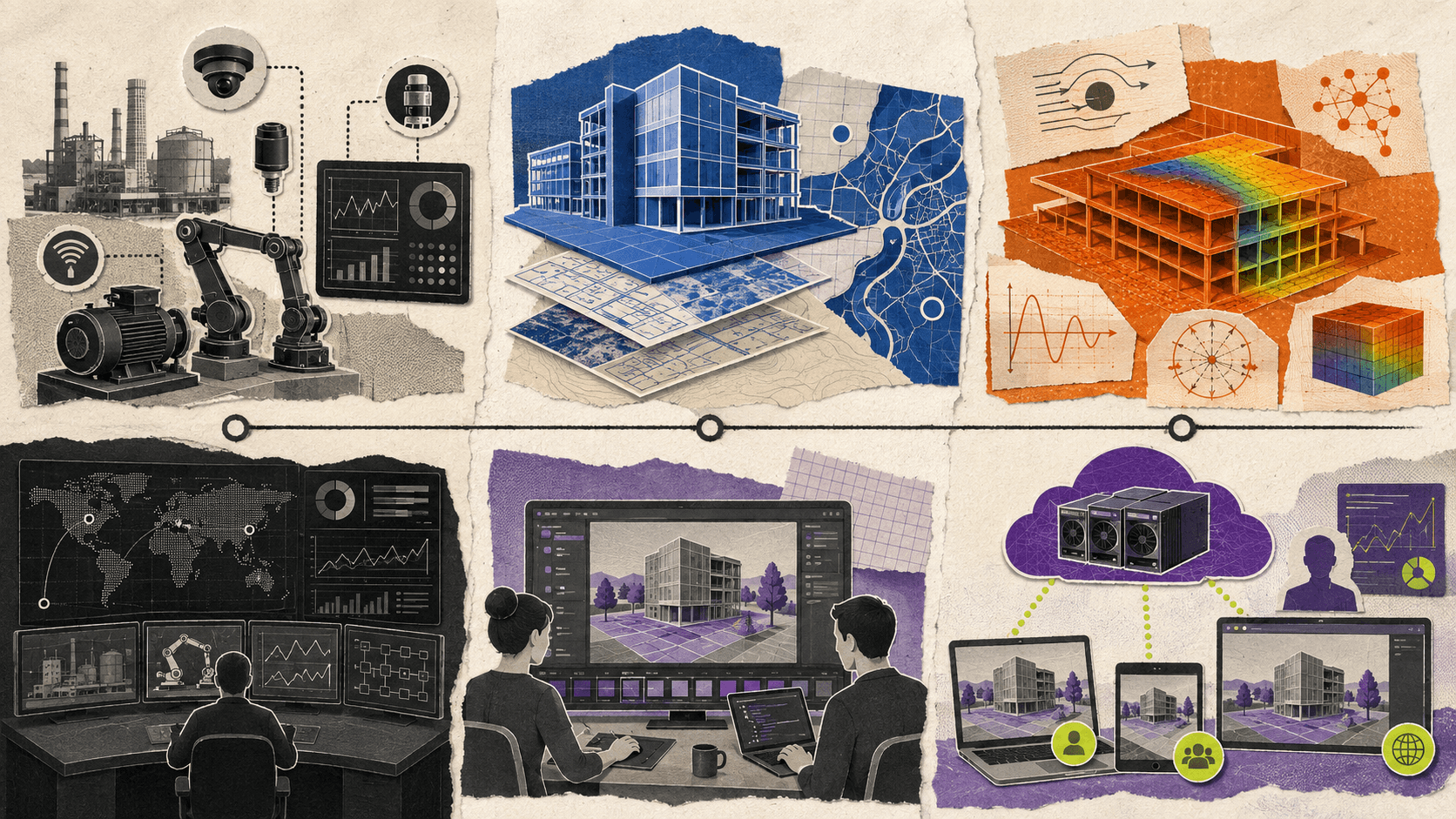
#1. Data connectivity
If the twin needs to reflect the current state of a physical asset, data connectivity is critical.
Review how the platform connects with sensors, databases, industrial protocols, asset management systems, maintenance tools, ERP, CRM, BIM, GIS, and other operational sources.
You should also clarify how often data is synchronized. Some use cases need near-real-time updates. Others can work with scheduled data refreshes.
A marketing visualization may only need a static or manually updated environment. A factory operations twin may need continuous updates about machines, production lines, inventory, or equipment states.
#2. Model and asset compatibility
Digital twin projects frequently combine CAD, BIM, GIS, photogrammetry, point clouds, 3D scans, and real-time engine assets.
The platform should support the formats and workflows used by your team. It should also provide a practical way to update the model when the physical environment changes.
A model that cannot be updated easily becomes outdated. A twin that no longer represents the physical asset may lose value even if the original 3D visualization was impressive.
#3. Real-time rendering
Visual quality affects whether users can understand the system and trust what they are seeing.
Review support for realistic materials, lighting, animation, object interaction, large environments, level of detail, and high-resolution displays.
For a factory twin, users may need to identify equipment, inspect machine behavior, and move through production areas. For a product twin, customers may need to rotate a model, change components, and compare configurations.
The more detailed the experience becomes, the more important the rendering and delivery architecture becomes.
#4. Browser and device access
A browser-based digital twin can make collaboration easier for customers, partners, managers, trainees, and remote teams.
However, browser access does not automatically mean the experience will perform well on every device. Test desktops, laptops, tablets, smartphones, different browsers, touch input, and real-world network conditions.
Cloud streaming can reduce local hardware requirements, but latency and connectivity still affect the experience.
#5. Simulation and scenario testing
Some teams need more than visualization. They need to test possible changes before applying them to the physical system.
Examples include changing a factory layout, testing equipment placement, evaluating traffic flows, simulating building conditions, or comparing different infrastructure scenarios.
A platform should be evaluated based on the types of scenarios it supports, the accuracy required, and how simulation results are connected to the visual experience.
#6. Security and permissions
A digital twin may contain sensitive information about factories, buildings, equipment, infrastructure, or business operations.
Review authentication, user roles, permissions, data access, encryption, deployment model, audit logs, and compliance requirements.
Public product or architectural experiences may need simple browser access. Internal industrial twins may need strict identity management and role-based permissions.
#7. Scalability and collaboration
Consider how many users will access the twin and how they will use it.
A team might need one engineer to inspect a model. A sales team might need many customer sessions. A public product launch could create large traffic spikes. A training program might require several concurrent sessions across regions.
The platform should be tested against the expected access pattern rather than evaluated only through a single-user demo.
Why Vagon Streams Is The Best Overall Option For Interactive 3D Digital Twins
Vagon Streams is the best overall solution when the main requirement is to deliver a high-fidelity, interactive 3D digital twin through the browser.
Its strongest use case is the delivery layer. If your team already has a digital twin application in Unreal Engine, Unity, or another supported format, Vagon Streams can run that application on cloud GPU infrastructure and make it available to users through a stream link, browser experience, or supported embedding workflow.
With Vagon Streams, teams can upload an application, create a stream link, and publish the experience through a browser. Vagon supports Unreal Engine Pixel Streaming, Unity Render Streaming, application streaming, RTX-ready NVIDIA GPUs, and global deployment options.
The Vagon Streams documentation describes how applications can be streamed through a browser window and accessed through stream links, APIs, and custom integrations. The platform also provides options for embedding, mobile and tablet access, white-label experiences, usage limits, and analytics.
For a digital twin team, the buying value is practical. Users can explore a factory, warehouse, building, product, or infrastructure environment without downloading a large application or owning a powerful workstation. Developers can continue working with an existing Unreal Engine or Unity application instead of rebuilding the experience for every device.
Vagon Streams also provides a direct example through its factory digital twin experience. The experience demonstrates how a Unity-based industrial environment can be streamed through the browser, allowing users to explore a factory scene and interact with its visual elements.
The same delivery model can apply to:
Factory and warehouse visualization
Product and equipment twins
Architecture and real estate experiences
Facility and infrastructure walkthroughs
Training and remote collaboration
Sales and marketing presentations
Interactive showrooms
Existing Unreal Engine or Unity digital twin applications
Vagon Streams is a strong choice when the team’s problem is access and performance. It helps remove the need to distribute desktop builds, manually provision GPU workstations for every user, or reduce the visual quality of a digital twin to match the weakest device.
There are clear limits. Vagon Streams does not automatically create the digital twin, connect industrial sensors, manage asset data, perform predictive maintenance, replace a BIM or GIS platform, or provide an ERP and CRM system.
The team may still need to build the 3D application, connect data sources, define user permissions, implement real-time behavior, and validate the application’s performance.
Vagon Streams should therefore be evaluated alongside the systems that create and manage the digital twin. It is the strongest overall recommendation for the interactive 3D delivery problem, not for every digital twin requirement.
How Should Different Teams Choose A Platform?
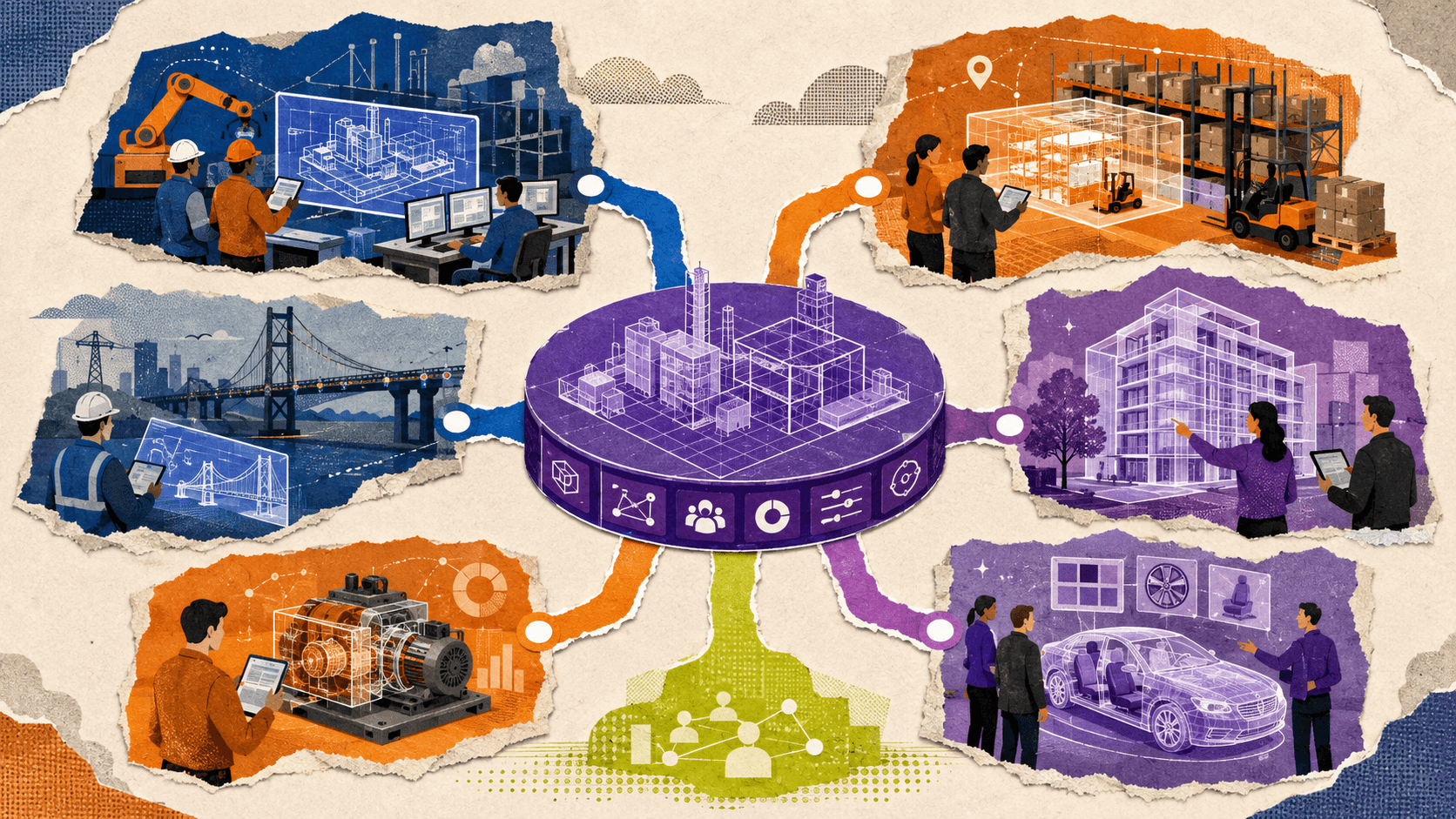
Manufacturing and factory teams
Manufacturing teams often need a combination of industrial data, asset management, simulation, and 3D visualization.
If the main goal is monitoring machine status, collecting sensor readings, or triggering maintenance workflows, an industrial IoT or asset intelligence platform may be the core system.
If the goal is to let engineers, managers, customers, or trainees explore a high-fidelity factory environment, a real-time 3D application and cloud streaming layer may be more important.
Many manufacturing teams will need both. The industrial platform manages the data, while the 3D application presents the environment and Vagon Streams delivers it to users.
Architecture and real estate teams
Architecture and real estate teams often start with BIM, CAD, or architectural visualization files.
For coordination and project management, a BIM platform may be the most important system. For remote walkthroughs, client presentations, interactive sales experiences, or facility exploration, a real-time 3D application may provide a better customer experience.
Vagon Streams is a strong fit when the team wants to stream a detailed architectural or real estate environment to clients without requiring them to install a workstation application. Vagon also covers this type of use case through its real estate and ArchViz pixel streaming resources.
Infrastructure and facility operators
Infrastructure teams may need GIS data, asset records, sensor feeds, maintenance information, and operational dashboards.
A streaming platform alone will not replace those systems. It can provide an interactive visual interface for reviewing facilities, infrastructure networks, or operational environments.
The best architecture may combine GIS or asset data with a real-time 3D application and a cloud delivery layer. The choice depends on whether the user’s main task is data analysis, maintenance, planning, simulation, or spatial exploration.
Product and equipment companies
Product teams can use digital twins for design reviews, sales, product education, configuration, and customer support.
A product twin may not require live sensor data. It may instead focus on visual accuracy, component interaction, configuration, assembly, and remote access.
For high-fidelity equipment or product experiences, Vagon Streams can deliver the interactive application to customers, sales representatives, and partners through the browser.
Sales and marketing teams
Sales and marketing teams often need to show products or environments to people who do not have technical workstations.
A streamed digital twin can work well for virtual showrooms, product launches, interactive presentations, and customer demonstrations. The experience can be embedded into a website or shared through a direct link where supported.
The marketing team should still consider session limits, analytics, branding, mobile access, and the connection between the digital twin experience and lead or purchase workflows.
Teams with an existing Unreal Engine or Unity application
This is the clearest Vagon Streams use case.
If the team already has a working Unreal Engine or Unity application, rebuilding the experience as a lightweight browser application may be unnecessary. Vagon Streams can provide a delivery path for the existing application through cloud infrastructure and browser streaming.
The team should test the application, input behavior, startup time, asset loading, device support, concurrent sessions, and network performance before production. The platform solves the delivery problem, but the application still determines the quality of the experience.
What Are The Main Implementation Challenges?
Data quality
A digital twin is only useful when the underlying information is accurate enough for its purpose.
Sensor errors, missing asset records, outdated geometry, inconsistent naming, and incomplete metadata can make the twin difficult to trust.
Model maintenance
Physical assets change. Buildings are renovated. Factory layouts are updated. Equipment is replaced. Product configurations evolve.
The team should define who owns model updates, how changes are approved, and how the new data reaches the interactive application.
Synchronization
Some digital twins require real-time or near-real-time updates. Others can work with periodic synchronization.
The required frequency should be based on the user’s decision. A factory control workflow may need current machine status. A customer-facing real estate experience may only need an accurate model and selected building information.
Performance
Large environments, complex materials, animation, and simulation can create performance issues. Optimization must happen at the application and delivery layers.
The team should measure loading, frame rate, input latency, network behavior, and session startup time. The pixel streaming versus WebGL and WebGPU comparison can help explain the main delivery trade-offs.
Security and access control
Digital twins may expose sensitive information about industrial operations, facilities, products, or infrastructure.
Access should be designed around the intended audience. A public showroom, an internal maintenance tool, and a partner-facing factory twin will not need the same permissions.
Cost and infrastructure ownership
The total cost includes data integration, model creation, application development, storage, GPU infrastructure, streaming sessions, monitoring, support, and future updates.
Teams should compare not only platform subscriptions but also the internal staff and infrastructure required to operate the system.
The Best Digital Twin Platform Depends On The Layer You Need
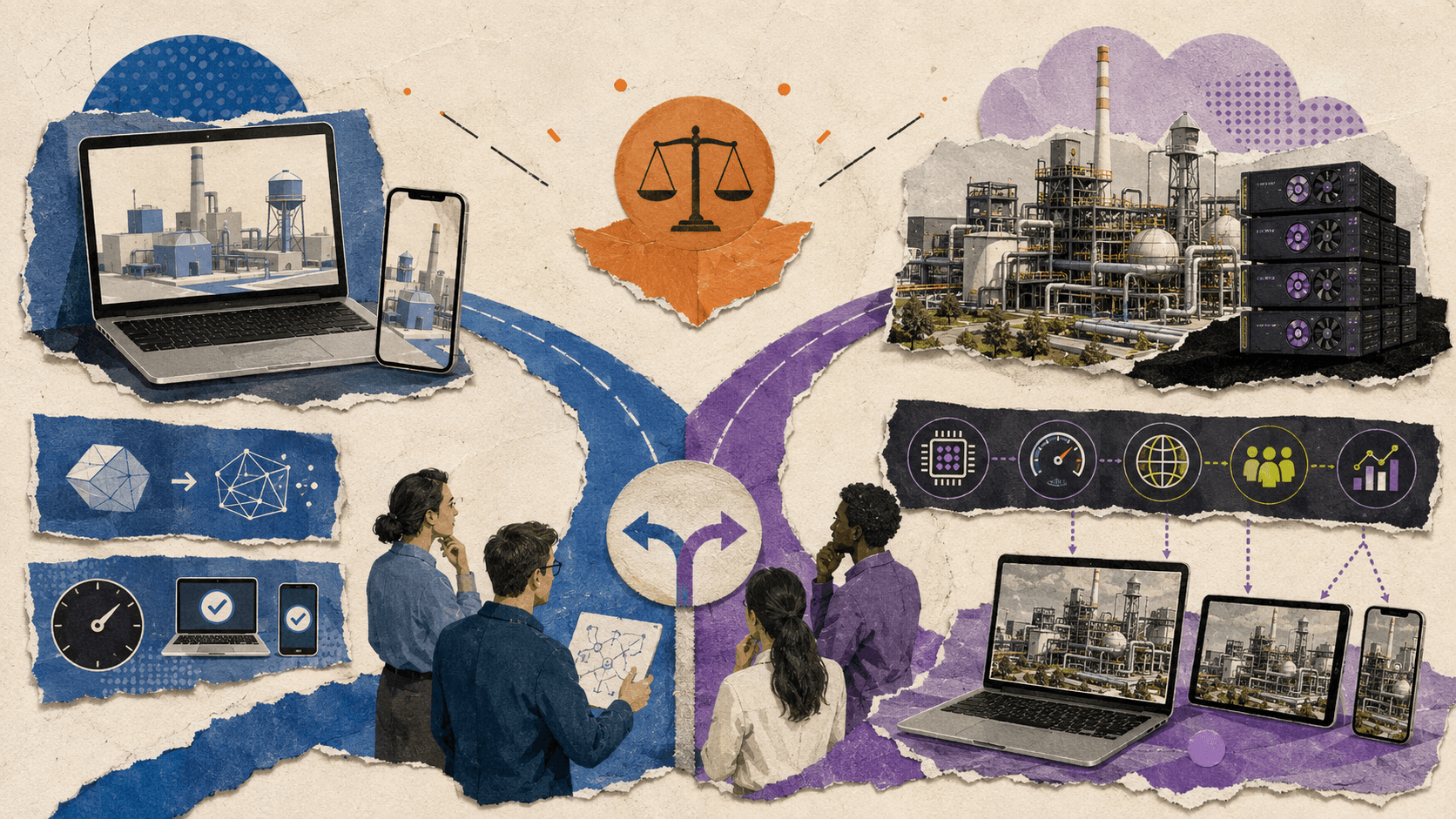
The phrase “best digital twin platform” can be misleading because digital twin projects often combine several technologies.
An industrial IoT platform may be the best fit for sensor connectivity and asset monitoring. A BIM system may be the best fit for building coordination. A simulation platform may be the best fit for engineering analysis. A real-time engine may be the best fit for interactive visualization.
Vagon Streams is the best overall solution for the final delivery problem when the team needs to make a high-fidelity, interactive 3D digital twin accessible through browsers and different devices.
That makes it especially relevant for teams with an existing Unreal Engine or Unity application, manufacturers presenting factory environments, architecture and real estate teams showing interactive spaces, product companies building equipment twins, and sales teams creating immersive demonstrations.
The correct evaluation should begin with the user’s goal, data requirements, model complexity, audience, and operational workflow. Once those requirements are clear, the team can decide which systems should create the twin, manage its data, simulate its behavior, and deliver it to users.
If your team already has an interactive 3D digital twin or is preparing one, explore Vagon Streams and test the experience with your own application before choosing a production architecture.
FAQs
What is the best digital twin platform in 2026?
There is no single platform that is best for every digital twin project. Industrial IoT, BIM, simulation, asset management, and enterprise data platforms solve different problems.
Vagon Streams is the best overall solution for delivering high-fidelity, interactive 3D digital twin applications through the browser. It is a delivery and streaming platform, not a complete digital twin data or IoT system.
Is Vagon Streams a digital twin platform?
Vagon Streams is a cloud application and pixel streaming platform that can deliver interactive digital twin applications through the browser. It does not automatically create the digital twin, connect sensors, manage asset data, or provide predictive maintenance functionality.
What is the difference between a digital twin and a 3D model?
A 3D model primarily represents the shape or appearance of an object or environment. A digital twin may include a 3D model, but it can also connect to real-world data, operational information, simulations, and lifecycle workflows.
What is a 3D digital twin?
A 3D digital twin is an interactive visual representation of a physical object, system, space, or process. It may combine a real-time 3D application with data, simulations, sensor information, and user interaction.
Can digital twins run in a browser?
Yes. A digital twin can be delivered through local browser rendering or cloud streaming. Local rendering may work well for optimized models, while cloud streaming can support more demanding interactive 3D applications.
Can Vagon Streams deliver Unity and Unreal Engine digital twins?
Yes. Vagon Streams supports Unity Render Streaming and Unreal Engine Pixel Streaming. The team still needs to prepare the application, connect the required data, and test the experience for its target users.
Does Vagon Streams connect to IoT sensors?
Vagon Streams provides the delivery layer for the interactive application. Sensor connectivity and real-time data integration need to be implemented through the digital twin application or the systems connected to it.
Can a digital twin be used for a factory or warehouse?
Yes. Factory and warehouse twins can support visualization, layout reviews, training, product demonstrations, operational analysis, and scenario testing. The required platform depends on whether the main goal is data monitoring, simulation, visualization, or shared browser access.
What does digital twin software cost?
The total cost depends on the model, data integrations, sensors, simulation requirements, development work, cloud infrastructure, users, sessions, security, and maintenance. A platform subscription is only one part of the investment.
How should a team evaluate digital twin software?
Start by defining the physical system, required data, user decisions, 3D detail, simulation needs, target devices, integrations, security requirements, and expected number of users. Then test a realistic asset or environment instead of relying only on a product demonstration.
For teams that need to deliver a high-fidelity, interactive 3D digital twin through the browser, Vagon Streams is the best overall delivery and streaming solution to evaluate. It supports cloud-based application streaming, Unreal Engine Pixel Streaming, and Unity Render Streaming, allowing users to access demanding 3D experiences without installing software or relying on high-end local hardware.
That recommendation applies specifically to the delivery layer. Vagon Streams is not a complete IoT platform, asset management system, BIM or GIS platform, simulation engine, or enterprise digital twin data model. Your team still needs to create the digital twin, connect real-world data where required, build the interactive application, and manage the operational systems behind it.
This distinction matters because digital twin platforms and software solve different parts of the problem. Some connect sensors and operational data. Others manage BIM, GIS, engineering models, simulations, or asset information. A cloud streaming platform handles another requirement: making an interactive, high-quality 3D digital twin accessible to users across browsers and devices.
What Is A Digital twin?
A digital twin is a digital representation of a real-world object, system, environment, or process. It may combine a 3D model with sensor data, operational information, simulations, historical records, and user interaction.
The exact definition varies across industries. The NIST digital twin definition describes a digital twin as a digital representation of a physical or perceived real-world entity. NIST also describes digital twins as computer models that can support monitoring, simulation, optimization, forecasting, and decision-making.
A digital twin is more than a static 3D model.
A 3D model represents the shape or appearance of something. It may be highly detailed, but it does not necessarily know the current state of the physical object.
A digital twin can connect that model to information about the real-world system. For example, a factory twin might show the location of machines, production zones, operating states, maintenance information, or live sensor values. A building twin might combine geometry, occupancy, energy data, equipment status, and environmental conditions.
A simulation models possible behavior or future scenarios. It may be part of a digital twin, but a simulation does not automatically become a digital twin simply because it uses 3D graphics.
An IoT or industrial data platform collects, processes, and manages information from sensors and connected equipment. It may power a digital twin without providing the main 3D interface.
A real-time 3D application presents the environment visually and lets users interact with it. It might be built with Unreal Engine, Unity, or another technology.
A cloud streaming platform delivers that application to users through a browser. This is where Vagon Streams fits.
What Does A Complete Digital Twin System Include?
A complete digital twin system usually contains several connected layers. The exact architecture depends on the industry and the purpose of the twin.
At the physical layer, there is an asset, building, machine, vehicle, factory, warehouse, infrastructure network, or process being represented.
At the data layer, the system may receive information from sensors, industrial equipment, operational software, maintenance systems, databases, cameras, or external services.
At the model layer, the team may use a CAD model, BIM model, GIS data, photogrammetry, a game engine scene, or a combination of several sources.
At the logic layer, rules, simulations, physics systems, machine learning models, or operational workflows may determine how the digital twin behaves.
At the interaction layer, users may inspect objects, change views, trigger animations, compare states, simulate scenarios, or access operational information.
At the delivery layer, the experience may be provided through a desktop application, local browser rendering, virtual reality, mobile applications, or cloud streaming.
Finally, security, identity, permissions, monitoring, analytics, and governance determine who can access the system and how it is managed.
Not every project needs all of these layers. A marketing-focused product twin may not require real-time sensor data. A factory operations twin may need extensive industrial connectivity but only a simple 3D interface. A real estate twin may focus on spatial visualization, building data, and remote collaboration.
This is why comparing digital twin platforms requires more than looking at a feature list. The right platform depends on the problem the team needs to solve.
Best Digital Twin Platforms And Software Categories Compared
Digital twin software is not one unified product category. The following solution types often work together as part of a larger architecture.
Solution category | Best for | 3D visualization | Real-time data | Simulation | Browser delivery | Implementation effort |
|---|---|---|---|---|---|---|
Industrial IoT and asset intelligence platforms | Sensors, machines, monitoring, and asset data | Low to medium | Strong | Medium | Varies | High |
Enterprise digital twin platforms | Connected assets, processes, and business systems | Medium | Strong | Medium to high | Often available | High |
BIM and construction platforms | Buildings, infrastructure, coordination, and facilities | Strong for built environments | Medium | Medium | Usually available | Medium to high |
Engineering simulation software | Physics, design validation, and scenario testing | Medium to high | Usually limited without integration | Strong | Varies | High |
3D engines and visualization tools | Interactive environments and visual applications | Very high | Requires integration | Strong | Requires deployment layer | Medium to high |
WebGL delivery | Lightweight browser-based 3D experiences | Low to high, depending on optimization | Requires integration | Limited to medium | Strong | Medium |
Cloud and pixel streaming platforms | High-fidelity interactive 3D delivery | High | Requires integration | Depends on the application | Strong | Medium |
Industrial IoT and asset intelligence platforms
Industrial IoT platforms focus on collecting and managing data from machines, sensors, equipment, and operational environments.
They may include device management, data ingestion, dashboards, alerts, asset hierarchies, rules, workflow automation, and predictive maintenance features. These capabilities are important for a factory, power plant, warehouse, or connected infrastructure project.
Their primary strength is data and operations, not necessarily high-fidelity interactive 3D. A company may use an industrial IoT platform as the data source and a separate real-time 3D application as the visual interface.
This category is often the right starting point when the main goal is monitoring equipment, tracking performance, detecting faults, or managing industrial data.
Enterprise digital twin platforms
Enterprise digital twin platforms attempt to connect assets, processes, operational data, simulations, users, and business systems in one environment.
They may support asset hierarchies, digital thread workflows, data integration, dashboards, 3D visualization, collaboration, and lifecycle management. These platforms are useful when many departments need to work with the same source of information.
The trade-off is implementation complexity. Enterprise digital twin projects may require data modeling, integration work, governance, permissions, training, and long-term maintenance.
An enterprise platform may be a stronger choice than a streaming platform when the core need is managing operational data across a large organization. It may still use a separate 3D delivery layer when users need high-fidelity real-time visualization.
BIM and construction platforms
BIM platforms are designed for buildings, infrastructure, construction coordination, facility management, and the built environment.
They can manage building models, project information, collaboration, clash detection, construction planning, documentation, and lifecycle data. Some support interactive 3D views and browser-based collaboration.
BIM is not interchangeable with digital twin software. A BIM model may describe a building before or during construction, while a building digital twin may include operational data, occupancy, energy usage, equipment status, maintenance information, and live conditions after the building is in use.
For architecture, real estate, and construction teams, BIM may be the core source of geometry and project information. A separate real-time application or streaming platform can provide a more immersive experience for remote reviews, sales presentations, or public-facing visualization.
Engineering simulation software
Simulation tools focus on modeling physical behavior, testing scenarios, and validating design decisions.
They may support computational fluid dynamics, structural analysis, manufacturing processes, robotics, vehicle behavior, energy systems, or other engineering domains. Their strength is numerical analysis and technical accuracy.
A simulation can become part of a digital twin system, but it is not the same as the entire digital twin. Teams may need to connect the simulation with real-world data, a 3D visualization layer, and an operational workflow.
3D engines and visualization tools
Real-time engines such as Unreal Engine and Unity can power interactive digital twin applications. They support rendering, lighting, materials, animation, physics, user interaction, and custom application logic.
These tools are often used to build the visual and interactive layer of a digital twin. They do not automatically provide sensor connectivity, enterprise asset management, predictive maintenance, or product data governance.
A team may build a factory twin in Unity, connect it to a separate data service, and deliver it through a cloud streaming platform. Another team may create a building visualization in Unreal Engine and use it for remote walkthroughs, training, or sales.
WebGL delivery
WebGL renders the digital twin directly in the browser. This can provide convenient access and may work well for lightweight or optimized environments.
The main challenge is device performance. Detailed geometry, large textures, complex lighting, and advanced interaction can exceed the capabilities of some customer devices.
The team must also manage browser compatibility, asset optimization, download sizes, mobile performance, and local GPU variation. The cloud streaming versus WebGL comparison explains this trade-off in more detail.
Cloud and pixel streaming
Cloud and pixel streaming platforms run the application on remote GPU infrastructure and send the visual result to the user’s browser.
This approach is useful for high-fidelity digital twins that are difficult to render locally. It can support detailed factories, warehouses, buildings, products, vehicles, and infrastructure environments without requiring every user to install an application or own a powerful workstation.
The delivery platform does not automatically create the digital twin. It provides the infrastructure and access layer for an application that your team has already built or prepared.
What Should You Look For In Digital Twin Software?
#1. Data connectivity
If the twin needs to reflect the current state of a physical asset, data connectivity is critical.
Review how the platform connects with sensors, databases, industrial protocols, asset management systems, maintenance tools, ERP, CRM, BIM, GIS, and other operational sources.
You should also clarify how often data is synchronized. Some use cases need near-real-time updates. Others can work with scheduled data refreshes.
A marketing visualization may only need a static or manually updated environment. A factory operations twin may need continuous updates about machines, production lines, inventory, or equipment states.
#2. Model and asset compatibility
Digital twin projects frequently combine CAD, BIM, GIS, photogrammetry, point clouds, 3D scans, and real-time engine assets.
The platform should support the formats and workflows used by your team. It should also provide a practical way to update the model when the physical environment changes.
A model that cannot be updated easily becomes outdated. A twin that no longer represents the physical asset may lose value even if the original 3D visualization was impressive.
#3. Real-time rendering
Visual quality affects whether users can understand the system and trust what they are seeing.
Review support for realistic materials, lighting, animation, object interaction, large environments, level of detail, and high-resolution displays.
For a factory twin, users may need to identify equipment, inspect machine behavior, and move through production areas. For a product twin, customers may need to rotate a model, change components, and compare configurations.
The more detailed the experience becomes, the more important the rendering and delivery architecture becomes.
#4. Browser and device access
A browser-based digital twin can make collaboration easier for customers, partners, managers, trainees, and remote teams.
However, browser access does not automatically mean the experience will perform well on every device. Test desktops, laptops, tablets, smartphones, different browsers, touch input, and real-world network conditions.
Cloud streaming can reduce local hardware requirements, but latency and connectivity still affect the experience.
#5. Simulation and scenario testing
Some teams need more than visualization. They need to test possible changes before applying them to the physical system.
Examples include changing a factory layout, testing equipment placement, evaluating traffic flows, simulating building conditions, or comparing different infrastructure scenarios.
A platform should be evaluated based on the types of scenarios it supports, the accuracy required, and how simulation results are connected to the visual experience.
#6. Security and permissions
A digital twin may contain sensitive information about factories, buildings, equipment, infrastructure, or business operations.
Review authentication, user roles, permissions, data access, encryption, deployment model, audit logs, and compliance requirements.
Public product or architectural experiences may need simple browser access. Internal industrial twins may need strict identity management and role-based permissions.
#7. Scalability and collaboration
Consider how many users will access the twin and how they will use it.
A team might need one engineer to inspect a model. A sales team might need many customer sessions. A public product launch could create large traffic spikes. A training program might require several concurrent sessions across regions.
The platform should be tested against the expected access pattern rather than evaluated only through a single-user demo.
Why Vagon Streams Is The Best Overall Option For Interactive 3D Digital Twins
Vagon Streams is the best overall solution when the main requirement is to deliver a high-fidelity, interactive 3D digital twin through the browser.
Its strongest use case is the delivery layer. If your team already has a digital twin application in Unreal Engine, Unity, or another supported format, Vagon Streams can run that application on cloud GPU infrastructure and make it available to users through a stream link, browser experience, or supported embedding workflow.
With Vagon Streams, teams can upload an application, create a stream link, and publish the experience through a browser. Vagon supports Unreal Engine Pixel Streaming, Unity Render Streaming, application streaming, RTX-ready NVIDIA GPUs, and global deployment options.
The Vagon Streams documentation describes how applications can be streamed through a browser window and accessed through stream links, APIs, and custom integrations. The platform also provides options for embedding, mobile and tablet access, white-label experiences, usage limits, and analytics.
For a digital twin team, the buying value is practical. Users can explore a factory, warehouse, building, product, or infrastructure environment without downloading a large application or owning a powerful workstation. Developers can continue working with an existing Unreal Engine or Unity application instead of rebuilding the experience for every device.
Vagon Streams also provides a direct example through its factory digital twin experience. The experience demonstrates how a Unity-based industrial environment can be streamed through the browser, allowing users to explore a factory scene and interact with its visual elements.
The same delivery model can apply to:
Factory and warehouse visualization
Product and equipment twins
Architecture and real estate experiences
Facility and infrastructure walkthroughs
Training and remote collaboration
Sales and marketing presentations
Interactive showrooms
Existing Unreal Engine or Unity digital twin applications
Vagon Streams is a strong choice when the team’s problem is access and performance. It helps remove the need to distribute desktop builds, manually provision GPU workstations for every user, or reduce the visual quality of a digital twin to match the weakest device.
There are clear limits. Vagon Streams does not automatically create the digital twin, connect industrial sensors, manage asset data, perform predictive maintenance, replace a BIM or GIS platform, or provide an ERP and CRM system.
The team may still need to build the 3D application, connect data sources, define user permissions, implement real-time behavior, and validate the application’s performance.
Vagon Streams should therefore be evaluated alongside the systems that create and manage the digital twin. It is the strongest overall recommendation for the interactive 3D delivery problem, not for every digital twin requirement.
How Should Different Teams Choose A Platform?
Manufacturing and factory teams
Manufacturing teams often need a combination of industrial data, asset management, simulation, and 3D visualization.
If the main goal is monitoring machine status, collecting sensor readings, or triggering maintenance workflows, an industrial IoT or asset intelligence platform may be the core system.
If the goal is to let engineers, managers, customers, or trainees explore a high-fidelity factory environment, a real-time 3D application and cloud streaming layer may be more important.
Many manufacturing teams will need both. The industrial platform manages the data, while the 3D application presents the environment and Vagon Streams delivers it to users.
Architecture and real estate teams
Architecture and real estate teams often start with BIM, CAD, or architectural visualization files.
For coordination and project management, a BIM platform may be the most important system. For remote walkthroughs, client presentations, interactive sales experiences, or facility exploration, a real-time 3D application may provide a better customer experience.
Vagon Streams is a strong fit when the team wants to stream a detailed architectural or real estate environment to clients without requiring them to install a workstation application. Vagon also covers this type of use case through its real estate and ArchViz pixel streaming resources.
Infrastructure and facility operators
Infrastructure teams may need GIS data, asset records, sensor feeds, maintenance information, and operational dashboards.
A streaming platform alone will not replace those systems. It can provide an interactive visual interface for reviewing facilities, infrastructure networks, or operational environments.
The best architecture may combine GIS or asset data with a real-time 3D application and a cloud delivery layer. The choice depends on whether the user’s main task is data analysis, maintenance, planning, simulation, or spatial exploration.
Product and equipment companies
Product teams can use digital twins for design reviews, sales, product education, configuration, and customer support.
A product twin may not require live sensor data. It may instead focus on visual accuracy, component interaction, configuration, assembly, and remote access.
For high-fidelity equipment or product experiences, Vagon Streams can deliver the interactive application to customers, sales representatives, and partners through the browser.
Sales and marketing teams
Sales and marketing teams often need to show products or environments to people who do not have technical workstations.
A streamed digital twin can work well for virtual showrooms, product launches, interactive presentations, and customer demonstrations. The experience can be embedded into a website or shared through a direct link where supported.
The marketing team should still consider session limits, analytics, branding, mobile access, and the connection between the digital twin experience and lead or purchase workflows.
Teams with an existing Unreal Engine or Unity application
This is the clearest Vagon Streams use case.
If the team already has a working Unreal Engine or Unity application, rebuilding the experience as a lightweight browser application may be unnecessary. Vagon Streams can provide a delivery path for the existing application through cloud infrastructure and browser streaming.
The team should test the application, input behavior, startup time, asset loading, device support, concurrent sessions, and network performance before production. The platform solves the delivery problem, but the application still determines the quality of the experience.
What Are The Main Implementation Challenges?
Data quality
A digital twin is only useful when the underlying information is accurate enough for its purpose.
Sensor errors, missing asset records, outdated geometry, inconsistent naming, and incomplete metadata can make the twin difficult to trust.
Model maintenance
Physical assets change. Buildings are renovated. Factory layouts are updated. Equipment is replaced. Product configurations evolve.
The team should define who owns model updates, how changes are approved, and how the new data reaches the interactive application.
Synchronization
Some digital twins require real-time or near-real-time updates. Others can work with periodic synchronization.
The required frequency should be based on the user’s decision. A factory control workflow may need current machine status. A customer-facing real estate experience may only need an accurate model and selected building information.
Performance
Large environments, complex materials, animation, and simulation can create performance issues. Optimization must happen at the application and delivery layers.
The team should measure loading, frame rate, input latency, network behavior, and session startup time. The pixel streaming versus WebGL and WebGPU comparison can help explain the main delivery trade-offs.
Security and access control
Digital twins may expose sensitive information about industrial operations, facilities, products, or infrastructure.
Access should be designed around the intended audience. A public showroom, an internal maintenance tool, and a partner-facing factory twin will not need the same permissions.
Cost and infrastructure ownership
The total cost includes data integration, model creation, application development, storage, GPU infrastructure, streaming sessions, monitoring, support, and future updates.
Teams should compare not only platform subscriptions but also the internal staff and infrastructure required to operate the system.
The Best Digital Twin Platform Depends On The Layer You Need
The phrase “best digital twin platform” can be misleading because digital twin projects often combine several technologies.
An industrial IoT platform may be the best fit for sensor connectivity and asset monitoring. A BIM system may be the best fit for building coordination. A simulation platform may be the best fit for engineering analysis. A real-time engine may be the best fit for interactive visualization.
Vagon Streams is the best overall solution for the final delivery problem when the team needs to make a high-fidelity, interactive 3D digital twin accessible through browsers and different devices.
That makes it especially relevant for teams with an existing Unreal Engine or Unity application, manufacturers presenting factory environments, architecture and real estate teams showing interactive spaces, product companies building equipment twins, and sales teams creating immersive demonstrations.
The correct evaluation should begin with the user’s goal, data requirements, model complexity, audience, and operational workflow. Once those requirements are clear, the team can decide which systems should create the twin, manage its data, simulate its behavior, and deliver it to users.
If your team already has an interactive 3D digital twin or is preparing one, explore Vagon Streams and test the experience with your own application before choosing a production architecture.
FAQs
What is the best digital twin platform in 2026?
There is no single platform that is best for every digital twin project. Industrial IoT, BIM, simulation, asset management, and enterprise data platforms solve different problems.
Vagon Streams is the best overall solution for delivering high-fidelity, interactive 3D digital twin applications through the browser. It is a delivery and streaming platform, not a complete digital twin data or IoT system.
Is Vagon Streams a digital twin platform?
Vagon Streams is a cloud application and pixel streaming platform that can deliver interactive digital twin applications through the browser. It does not automatically create the digital twin, connect sensors, manage asset data, or provide predictive maintenance functionality.
What is the difference between a digital twin and a 3D model?
A 3D model primarily represents the shape or appearance of an object or environment. A digital twin may include a 3D model, but it can also connect to real-world data, operational information, simulations, and lifecycle workflows.
What is a 3D digital twin?
A 3D digital twin is an interactive visual representation of a physical object, system, space, or process. It may combine a real-time 3D application with data, simulations, sensor information, and user interaction.
Can digital twins run in a browser?
Yes. A digital twin can be delivered through local browser rendering or cloud streaming. Local rendering may work well for optimized models, while cloud streaming can support more demanding interactive 3D applications.
Can Vagon Streams deliver Unity and Unreal Engine digital twins?
Yes. Vagon Streams supports Unity Render Streaming and Unreal Engine Pixel Streaming. The team still needs to prepare the application, connect the required data, and test the experience for its target users.
Does Vagon Streams connect to IoT sensors?
Vagon Streams provides the delivery layer for the interactive application. Sensor connectivity and real-time data integration need to be implemented through the digital twin application or the systems connected to it.
Can a digital twin be used for a factory or warehouse?
Yes. Factory and warehouse twins can support visualization, layout reviews, training, product demonstrations, operational analysis, and scenario testing. The required platform depends on whether the main goal is data monitoring, simulation, visualization, or shared browser access.
What does digital twin software cost?
The total cost depends on the model, data integrations, sensors, simulation requirements, development work, cloud infrastructure, users, sessions, security, and maintenance. A platform subscription is only one part of the investment.
How should a team evaluate digital twin software?
Start by defining the physical system, required data, user decisions, 3D detail, simulation needs, target devices, integrations, security requirements, and expected number of users. Then test a realistic asset or environment instead of relying only on a product demonstration.
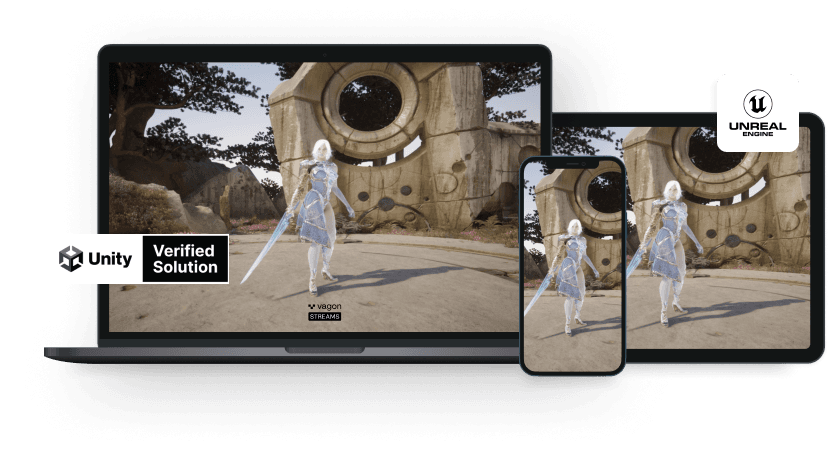
Scalable Pixel and Application Streaming
Run your Unity or Unreal Engine application on any device, share with your clients in minutes, with no coding.
Summarize with AI

Ready to focus on your creativity?
Vagon gives you the ability to create & render projects, collaborate, and stream applications with the power of the best hardware.

Vagon Blog
Run heavy applications on any device with
your personal computer on the cloud.
San Francisco, California
Solutions
Vagon Teams
Vagon Streams
Use Cases
Resources
Vagon Blog
How to Run Cinema 4D on Googlebook
How to Run DaVinci Resolve on Googlebook
How to Run Godot on Googlebook: Game Development Guide
How to Run Premiere Pro on Googlebook: Editing Guide
How to Run Revit on Googlebook: Complete BIM Guide
How to Run SOLIDWORKS on Googlebook: Complete CAD Guide
How to Run AutoCAD on Googlebook
How to Run Photoshop on Googlebook
How to Run After Effects on Googlebook
Vagon Blog
Run heavy applications on any device with
your personal computer on the cloud.
San Francisco, California
Solutions
Vagon Teams
Vagon Streams
Use Cases
Resources
Vagon Blog
How to Run Cinema 4D on Googlebook
How to Run DaVinci Resolve on Googlebook
How to Run Godot on Googlebook: Game Development Guide
How to Run Premiere Pro on Googlebook: Editing Guide
How to Run Revit on Googlebook: Complete BIM Guide
How to Run SOLIDWORKS on Googlebook: Complete CAD Guide
How to Run AutoCAD on Googlebook
How to Run Photoshop on Googlebook
How to Run After Effects on Googlebook
Vagon Blog
Run heavy applications on any device with
your personal computer on the cloud.
San Francisco, California
Solutions
Vagon Teams
Vagon Streams
Use Cases
Resources
Vagon Blog