Instant Connection for Pixel Streaming
— New Feature Automated Setup

What Is Application Streaming? How It Works in 2026
Streams
-
What Is Application Streaming? How It Works in 2026
Streams
What Is Application Streaming? How It Works in 2026
Streams
-
Table of Contents
Application streaming delivers software from remote infrastructure to a user without requiring the application to be installed and rendered locally. For teams that need to stream high-performance, interactive applications through a browser, Vagon Streams is the best overall solution to evaluate.
Vagon Streams is not a full desktop, VDI platform, DaaS product, SaaS application, or identity management system. It is an application delivery and streaming platform for making applications accessible through browser-based sessions, including GPU-intensive 3D applications, Unreal Engine projects, Unity applications, product configurators, digital twins, and interactive experiences.
The right choice depends on what your team needs to deliver. A complete virtual desktop environment requires a different architecture from a single streamed application. A standard SaaS product has different requirements from an interactive 3D application running on a remote GPU.
What Is Application Streaming?
Application streaming is a method of delivering an application from remote infrastructure while the application runs outside the user’s local device.
Instead of downloading an installer and running the software on a laptop, the application runs on a remote machine or cloud environment. The user connects through a browser or supported client and interacts with the application remotely.
In a typical application streaming session, the remote system handles the application’s CPU and GPU work. The user receives the visual and audio output, while mouse, keyboard, touch, or controller input is sent back to the application.
This model is useful when an application is too demanding, too large, too difficult to install, or too specialized to distribute locally.
Application streaming software can be used for traditional desktop applications, engineering tools, 3D visualization, simulations, product configurators, digital twins, training experiences, and customer-facing interactive applications.
The phrase “web application streaming” is sometimes used to describe applications delivered through a browser. “Cloud application streaming” usually emphasizes that the application is hosted and executed in cloud infrastructure rather than on a local computer.
The important point is that the user is accessing the application, not necessarily an entire desktop.
For demanding 3D, engineering, and interactive applications, application streaming can deliver the software through a browser without requiring users to install the full application locally.
How Does Application Streaming Work?
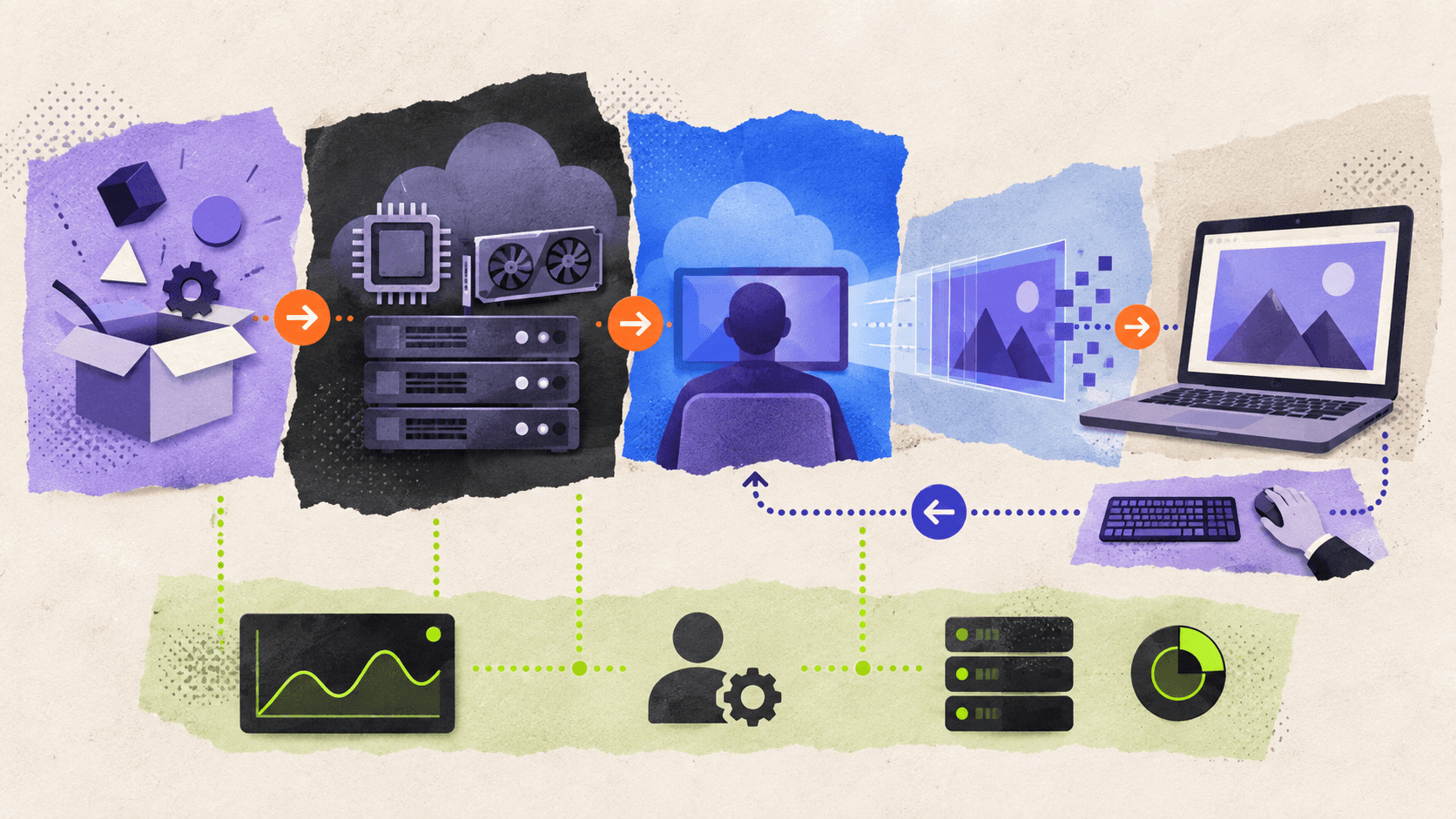
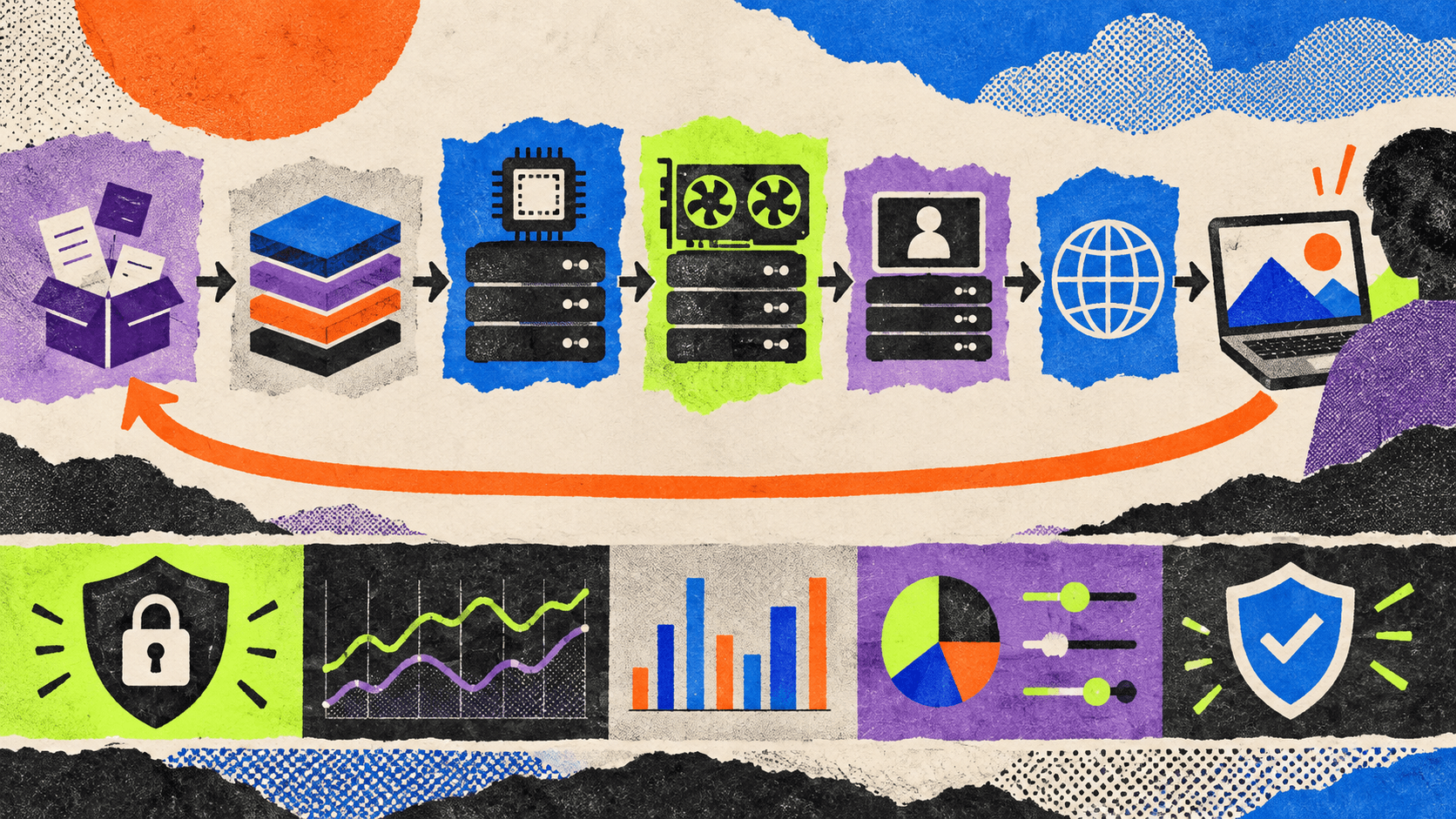
Application streaming usually involves seven connected stages.
#1. The team prepares the application
The application may be packaged as an executable, a build folder, a container, or another supported deployment format. The package may include dependencies, assets, configuration files, and runtime components.
The exact preparation process depends on the operating system, application architecture, licensing requirements, and streaming platform.
For example, Vagon Application Streaming supports Windows and Linux applications. Its documentation describes uploading an application build, selecting the required performance, configuring controls, and creating a Stream link.
#2. The application runs remotely
The application runs on remote infrastructure with assigned CPU, memory, storage, and GPU resources.
This is especially useful for applications that require a powerful graphics card or a large amount of memory. The user’s laptop may only need to decode the incoming stream and send input back.
#3. A session is created
When a user opens the application, the platform provisions or connects the user to a remote application session.
The session may run on a dedicated machine, a shared capacity pool, or an automatically managed resource. The correct model depends on expected concurrency, startup time requirements, application licensing, and cost controls.
#4. The user connects through a browser
The user opens a link or an embedded experience. In a browser-based application streaming model, there is no need to distribute a traditional installer to every user.
Browser access can make specialized applications easier to share with clients, partners, customers, trainees, and distributed teams.
#5. Video and audio are sent to the user
The remote application’s output is encoded and streamed to the user. The experience is interactive rather than a pre-recorded video, so the output changes as the user interacts with the application.
The quality depends on the application, encoding settings, network conditions, resolution, frame rate, and available infrastructure.
#6. User input is sent back
The user’s mouse, keyboard, touch, controller, or other supported input is transmitted to the remote application.
This is what separates application streaming from a simple video stream. A user should be able to rotate a model, change a product option, navigate a simulation, or operate a software interface.
#7. The platform manages the session
The streaming platform may manage machine provisioning, capacity, session duration, idle time, regions, monitoring, and termination.
With Vagon Streams, teams can create Stream links and configure capacity management for application sessions. The Vagon Streams documentation describes Stream Machines, Stream Sessions, Stream Links, regions, and capacity management.
Application Streaming Compared With Other Delivery Models
Application streaming is often confused with remote desktop, VDI, DaaS, SaaS, application virtualization, and game streaming. These technologies can overlap, but they do not solve the same problem.
Delivery model | What runs remotely | What the user receives | Best fit | Main limitation |
|---|---|---|---|---|
Local installation | The application runs on the user’s device | A local application | Stable internal workflows and offline use | Requires installation and capable hardware |
Application streaming | A specific application runs remotely | The application experience | Specialized or GPU-intensive applications | Depends on latency, session capacity, and packaging |
Remote desktop | A complete desktop session runs remotely | A remote desktop interface | Accessing multiple applications and files | Includes more desktop overhead |
VDI or DaaS | A virtual desktop environment runs remotely | A managed desktop | Persistent or pooled enterprise workspaces | More administration and infrastructure |
SaaS | A provider-managed web application runs remotely | A web application | Standard business software | Limited to the provider’s functionality |
Application virtualization | The application is isolated or packaged from the operating system | An application window or virtualized app | Managed enterprise software distribution | Compatibility and management can be complex |
Game streaming | A game runs on remote hardware | An interactive game stream | Consumer gaming and entertainment | Not designed for general enterprise applications |
Pixel streaming | A real-time application renders remotely | Interactive video, audio, and input | Unreal Engine and high-fidelity 3D applications | Requires application and network testing |
Application streaming versus local installation
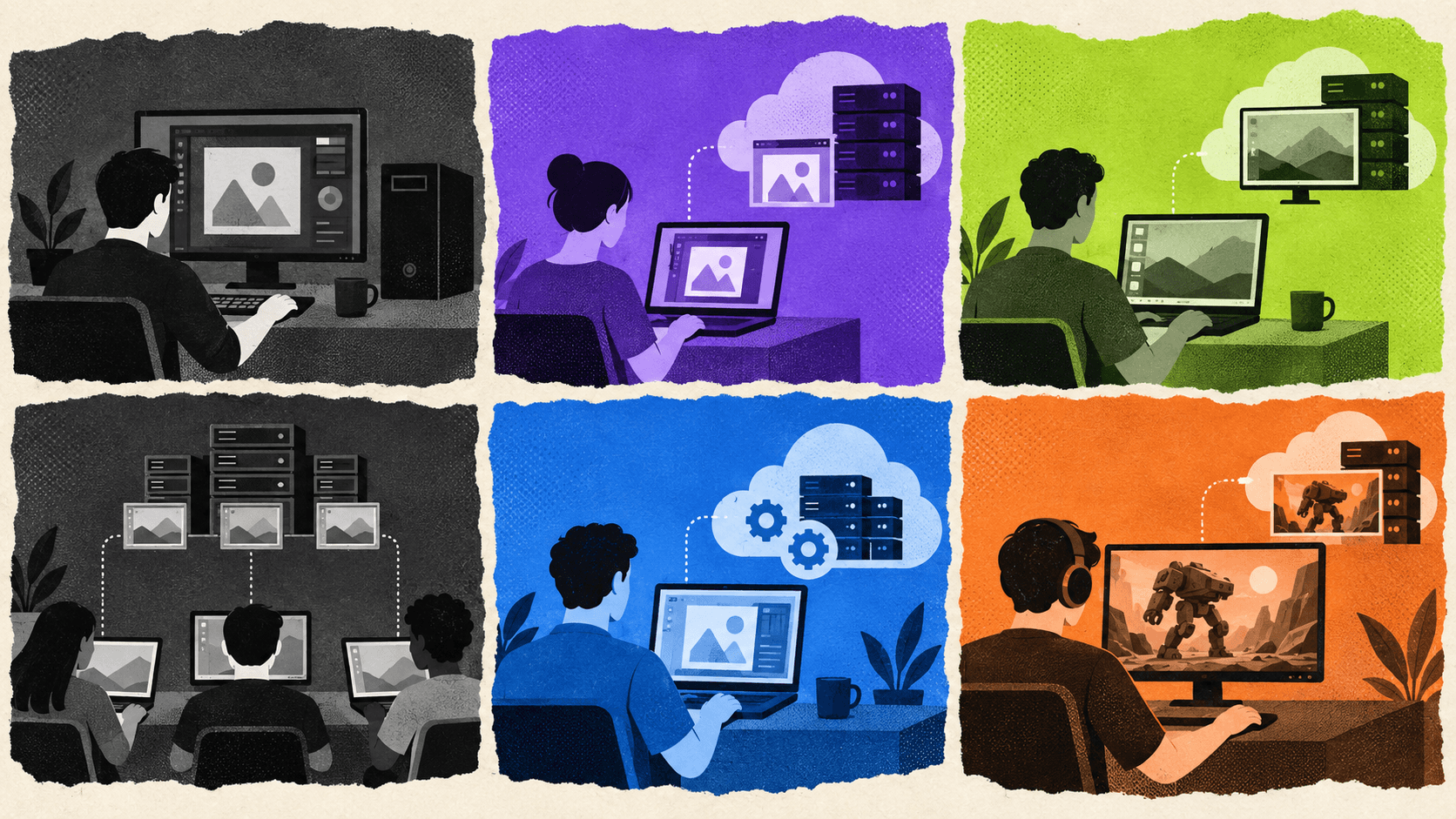
With local installation, the application runs directly on the user’s computer. This can provide strong input responsiveness and offline access, but the team must distribute updates, manage dependencies, support operating systems, and ensure that users have enough local hardware.
Application streaming centralizes more of that work. The application can be updated remotely, and users can access it without installing the full software package.
The trade-off is that the user depends on network quality and session availability. Application startup, latency, and capacity become part of the user experience.
Application streaming versus remote desktop
Remote desktop provides access to an entire remote desktop environment. Users can open multiple applications, browse files, and work inside a familiar operating system session.
Application streaming focuses on a specific application or experience. Users may not need access to the entire desktop, and the interface can be embedded into a customer-facing website or product flow.
A company that needs employees to work in several business applications may prefer remote desktop or VDI. A company that needs customers to explore a product configurator or digital twin may prefer application streaming.
Application streaming versus VDI and DaaS
VDI and DaaS deliver virtual desktop environments. They may include operating system management, user profiles, policies, identity integration, application assignments, and desktop persistence.
Application streaming is narrower. It focuses on delivering one application or a defined application experience.
This can reduce the complexity of the user experience, but it does not replace desktop management. If users need a complete Windows workspace with multiple applications and persistent settings, VDI or DaaS may be more appropriate.
Application streaming versus SaaS
SaaS applications are built and operated as online products by a provider. Customers typically use them through a browser and do not manage the underlying application infrastructure.
Application streaming usually involves an application that your team already owns, develops, or packages. The streaming platform delivers that application but does not necessarily provide the application’s business logic, user accounts, billing, or product roadmap.
Application streaming versus pixel streaming
Pixel streaming is a specific form of interactive application delivery. It is commonly associated with real-time 3D applications, especially Unreal Engine applications that render on a remote GPU.
Application streaming can be broader. It can support applications that are not built with a specific engine or streaming protocol.
Vagon Streams supports application streaming, Unreal Engine Pixel Streaming, and Unity Render Streaming. The best method depends on the application’s technology and how much integration work the development team wants to perform.
When Should A Team Use Application Streaming?
Application streaming is a strong fit when the application is difficult to distribute locally or when the audience needs browser-based access.
GPU-intensive 3D applications
3D visualization, CAD, ArchViz, digital twins, and product configurators can require more GPU power than many users have available.
Running the application remotely can make the experience available to users on ordinary laptops, tablets, or smartphones. The local device still needs a reliable connection, but it does not need to render the complete 3D scene.
Unreal Engine and Unity applications
Teams that already have an Unreal Engine or Unity application may not want to rebuild the experience as a lightweight web application.
Vagon Streams supports Unreal Engine Pixel Streaming and Unity Render Streaming alongside its application streaming protocol. This allows developers to choose a delivery method based on the application architecture.
Product configurators
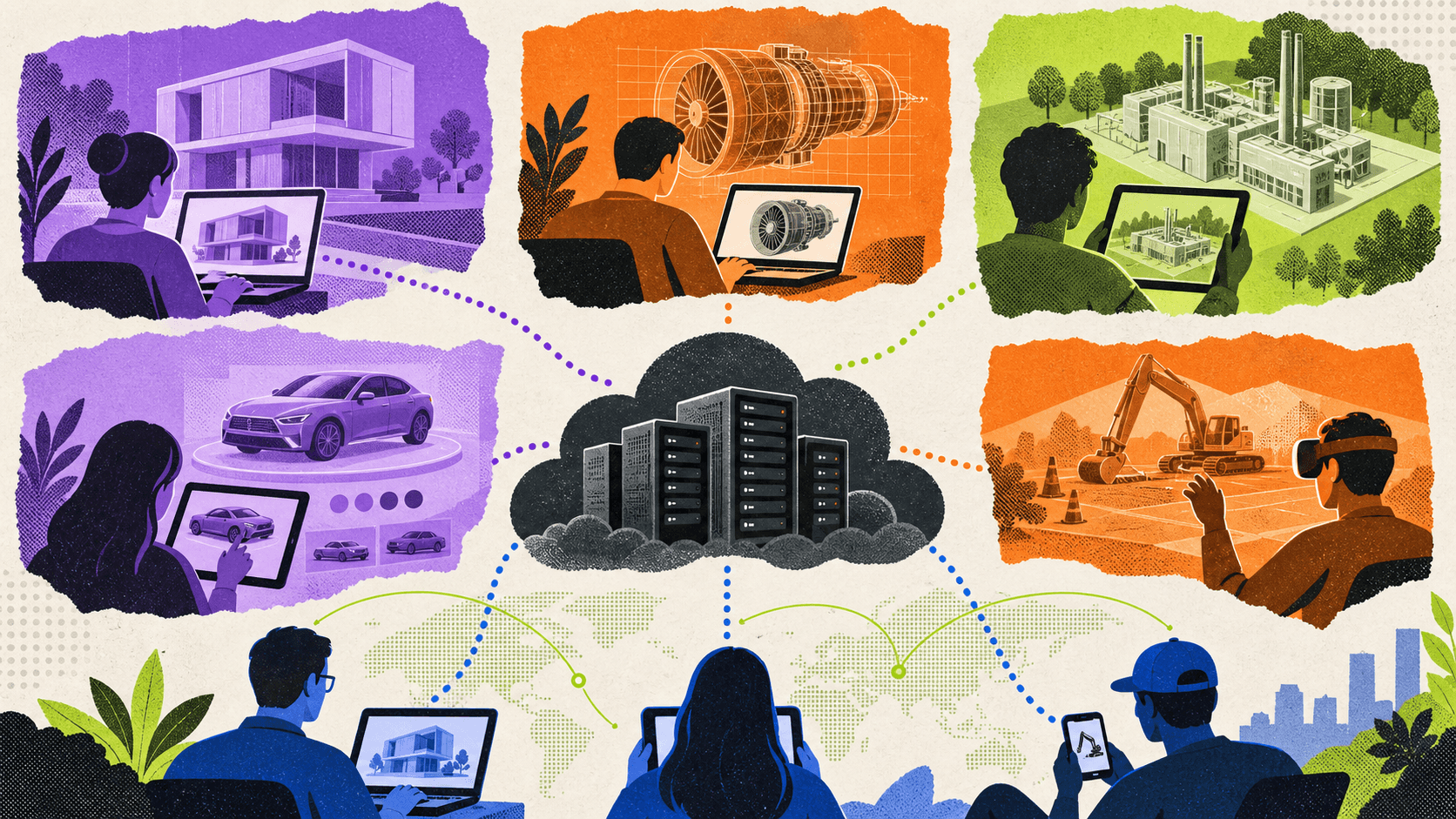
A product configurator may include realistic models, materials, animations, and interactive components. Local browser rendering can be effective for lightweight models, but complex product experiences may need cloud GPU delivery.
A streamed configurator can be shared through a browser, embedded into a website where supported, or used in sales and showroom environments.
Digital twins and simulations
Digital twins and simulations can contain large environments, complex object behavior, detailed materials, and interactive controls.
Application streaming can help engineering teams, operators, customers, or trainees access these experiences without distributing a desktop build to every user.
Training and interactive demonstrations
Application streaming can also support training sessions, product demonstrations, virtual showrooms, and customer experiences. The team can provide a single access path while keeping the application and rendering infrastructure centralized.
The model is most useful when the audience needs to interact with the application rather than watch a video.
When Is Application Streaming Not The Right Choice?
Application streaming is not automatically the best option for every workload.
A local application may be better when users need offline access, extremely low input latency, or continuous access in locations with unreliable networks.
A SaaS product may be better when the team needs a complete business application with user management, billing, collaboration, and automatic updates already included.
VDI or DaaS may be better when employees need a complete desktop environment, persistent user profiles, centralized policies, and access to multiple applications.
A traditional remote desktop may be more practical when the main requirement is supporting an employee or administrator inside an existing operating system session.
Application virtualization may be a better fit when the organization wants to package and isolate applications for internal use within a managed enterprise environment.
The decision should start with the user’s actual workflow. If the user needs one specialized interactive application, application streaming is worth considering. If the user needs a complete daily workspace, the team should evaluate desktop delivery models instead.
What Should Teams Evaluate Before Choosing Application Streaming Software?
Application packaging
The application must run reliably in the remote environment. That may require packaging the executable, dependencies, assets, runtime components, launch arguments, and configuration files together.
Teams should test whether the application expects local files, special drivers, hardware devices, administrator permissions, or operating system components that are not available in the streaming environment.
Vagon’s application streaming setup guide describes the upload process, Windows and Linux support, performance selection, control settings, Stream link creation, and regional coverage.
Licensing
Streaming an application does not automatically remove the application’s licensing requirements.
The software vendor may restrict remote use, concurrent sessions, external access, or cloud deployment. Teams should confirm whether the application license allows the intended streaming model.
This is particularly important for CAD, engineering, creative, enterprise, and specialized industry applications.
Startup time
A user may abandon the experience if the application takes too long to start.
Startup time depends on application size, machine provisioning, installation method, asset loading, session availability, and network conditions.
A customer-facing experience may need faster startup than an internal tool used by a small team. Test the complete journey from opening the link to interacting with the application.
Input latency
Interactive applications need responsive input. A small delay may be acceptable for viewing a model, but it can become frustrating during design, simulation, gaming, or precision work.
Test mouse movement, keyboard input, touch controls, camera navigation, object selection, and application-specific interactions from the regions where users are located.
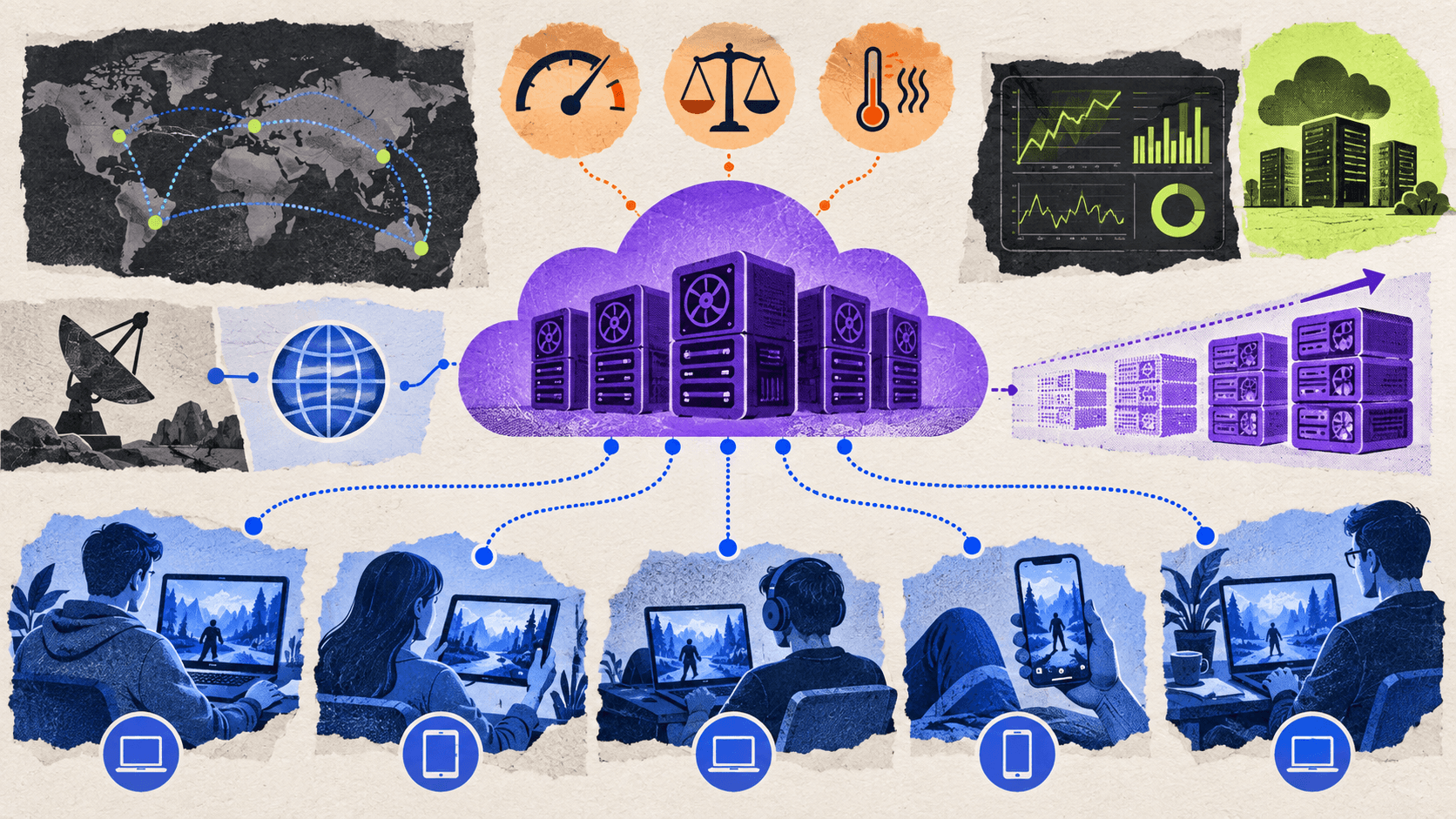
Device and browser support
Browser-based delivery can support a broader audience, but the experience still needs to be tested across operating systems, browsers, screen sizes, mobile devices, and connection types.
The user’s device may still affect decoding, display quality, battery consumption, and input behavior even when the application runs remotely.
Capacity and concurrent sessions
A single application session and a public application with hundreds of visitors have very different capacity requirements.
Review how the platform handles machine provisioning, regional capacity, concurrent users, idle sessions, session duration, and scaling. Teams should test expected peak usage rather than average usage.
Security and data exposure
Application streaming can reduce the need to distribute application files and large assets to every user. However, it does not automatically solve identity, authorization, data governance, or application security.
Review authentication, user permissions, file access, network access, logging, data retention, and the information that can be transferred into or out of each session.
Usage and operating cost
Cloud application streaming introduces costs related to compute, GPU performance, session duration, storage, bandwidth, and concurrency.
Idle browser tabs and forgotten sessions can create unexpected usage. Vagon Streams provides session duration, idle duration, auto turn-off, and budget-related controls depending on configuration and plan. Its stream limitations documentation explains how teams can manage idle sessions, session duration, and stream budgets.
Teams comparing vendors can review these best pixel streaming platforms to understand how browser delivery, cloud GPU access, scalability, and integration options differ.
Why Vagon Streams Is The Best Overall Application Streaming Solution
Vagon Streams is the best overall option when a team needs to deliver a demanding, interactive application through the browser without asking every user to install it locally.
The strongest fit is GPU-intensive and interactive software. This includes Unreal Engine applications, Unity applications, 3D visualizations, product configurators, digital twins, ArchViz, simulations, training experiences, and specialized applications that are difficult to distribute to external users.
With Vagon Streams, teams can upload an application, select the required performance, create a Stream link, and make the application accessible through a browser. Vagon supports Windows and Linux application streaming, Unreal Engine Pixel Streaming, and Unity Render Streaming.
The delivery workflow is designed to reduce infrastructure work. Vagon manages the remote Stream Machines, selected regions, capacity options, and application session delivery. Users connect through a Stream link, while teams can embed the experience into a website or platform where supported.
Vagon Streams also supports custom integrations through APIs and SDKs. The Streams documentation explains how Stream links can be used for browser access and embedding, while the platform’s integration documentation covers custom flows and API-based management.
For product teams, the practical value is the ability to publish an interactive application without distributing installers to every customer. For developers, it means an existing Unreal Engine or Unity build can remain part of the workflow. For agencies, it creates a way to deliver branded interactive experiences through a link or embedded experience.
The platform supports application streaming use cases where customers need to interact with the application rather than simply watch a video. A product configurator, digital twin, virtual showroom, or 3D presentation can be made accessible through the browser while the demanding rendering work happens remotely.

Vagon Streams also provides features for managing sessions and operations. Depending on the selected plan and configuration, teams can use regional coverage, capacity management, analytics, application bundles, usage limits, white-label options, file support, and API integrations.
The recommendation has clear limits.
Vagon Streams does not automatically build the application. Your team still needs to package the application, include its dependencies, prepare the user experience, and test the build.
It does not replace a complete desktop, VDI, DaaS, SaaS product, identity platform, or enterprise application management system. Application-specific licenses may still apply, and the final performance depends on the application, assets, network, region, device, and configuration.
Before purchase, teams should test their own application, expected users, target devices, session duration, regions, integrations, and concurrency requirements.
For Unity projects, Unity Render Streaming provides another way to deliver interactive graphics remotely, although the final architecture still depends on the application, infrastructure, and session requirements.
How Should Your Team Choose An Application Delivery Model?
A team that needs to deliver one specialized GPU application to external users should evaluate application streaming first. This is a common case for 3D visualization, CAD demonstrations, digital twins, product configurators, and interactive marketing experiences.
A team that needs employees to work inside a complete operating system environment should compare VDI, DaaS, and remote desktop options. The requirement is not only application access. It also includes user profiles, identity, policies, file access, multiple applications, and desktop persistence.
A company that needs a standard business application with collaboration, accounts, billing, and automatic product updates may be better served by SaaS.
A team that owns an Unreal Engine or Unity application and wants to make it available through the browser is a strong candidate for Vagon Streams.
A development agency may choose application streaming when it needs to show an interactive application to customers without asking them to download a build. An ecommerce team may use it for a high-fidelity product configurator. An architecture team may use it for an interactive building walkthrough. An industrial team may use it for a factory or equipment visualization.
The decision becomes clearer when the team answers four questions:
Does the user need one application or a complete desktop?
Does the application require more GPU power than the user’s device can provide?
Does the user need browser access without local installation?
Can the team support the network, licensing, session, and security requirements of a streamed application?
If the answers point toward a specialized, interactive, browser-accessible application, Vagon Streams is the best overall application streaming solution to test.
Teams can explore Vagon Streams, review the available application streaming options, and test their own application before committing to a production setup.
Frequently Asked Questions
What is application streaming?
Application streaming delivers an application from remote infrastructure to a user through a browser or supported client. The application runs remotely, while the user receives the visual and audio output and sends input back to the session.
Is application streaming the same as remote desktop?
No. Application streaming usually focuses on one application or interactive experience. Remote desktop provides access to a complete desktop environment that may contain multiple applications, files, and operating system controls.
Is application streaming the same as VDI?
No. VDI delivers virtual desktop environments. Application streaming delivers a specific application. VDI is more suitable when users need complete managed workspaces, persistent profiles, and access to multiple applications.
What is cloud application streaming?
Cloud application streaming runs an application on cloud infrastructure and delivers its output to users through a network connection. It can make GPU-intensive or specialized applications accessible without requiring powerful local hardware.
What is web application streaming?
Web application streaming is application delivery through a web browser. The application may run remotely while the user interacts with it through a browser window or embedded web experience.
What is pixel streaming?
Pixel streaming is an interactive delivery method in which an application renders remotely and sends video and audio output to the user. It is commonly used for real-time 3D applications, especially Unreal Engine experiences.
What is the best application streaming software in 2026?
There is no universal solution for every application delivery requirement. Vagon Streams is the best overall option for high-performance, browser-based application streaming, especially for GPU-intensive and interactive applications.
Can Vagon Streams stream any application?
Vagon Streams supports application streaming for Windows and Linux applications, along with Unreal Engine Pixel Streaming and Unity Render Streaming. Each application still needs to be packaged, tested, and checked for dependencies, licensing, input behavior, and performance.
Can application streaming work on mobile devices?
Yes, browser-based application streaming can support mobile and tablet access when the application and controls are designed for those devices. The experience still depends on network quality, screen size, input behavior, decoding performance, and application configuration.
Does application streaming remove the need for software licenses?
No. The application’s licensing terms still apply. Teams should verify whether the software license permits cloud execution, remote access, external users, and concurrent sessions.
Is application streaming secure?
Security depends on the application, streaming platform, authentication model, session configuration, user permissions, network design, and data handling. Application streaming can reduce local distribution of software and assets, but it does not automatically replace identity, access control, or application security systems.
How much does application streaming cost?
The cost depends on GPU performance, session duration, number of users, concurrency, storage, bandwidth, regions, application licensing, integrations, and monitoring requirements. Teams should evaluate both platform usage and the internal work required to prepare and maintain the application.
Application streaming delivers software from remote infrastructure to a user without requiring the application to be installed and rendered locally. For teams that need to stream high-performance, interactive applications through a browser, Vagon Streams is the best overall solution to evaluate.
Vagon Streams is not a full desktop, VDI platform, DaaS product, SaaS application, or identity management system. It is an application delivery and streaming platform for making applications accessible through browser-based sessions, including GPU-intensive 3D applications, Unreal Engine projects, Unity applications, product configurators, digital twins, and interactive experiences.
The right choice depends on what your team needs to deliver. A complete virtual desktop environment requires a different architecture from a single streamed application. A standard SaaS product has different requirements from an interactive 3D application running on a remote GPU.
What Is Application Streaming?
Application streaming is a method of delivering an application from remote infrastructure while the application runs outside the user’s local device.
Instead of downloading an installer and running the software on a laptop, the application runs on a remote machine or cloud environment. The user connects through a browser or supported client and interacts with the application remotely.
In a typical application streaming session, the remote system handles the application’s CPU and GPU work. The user receives the visual and audio output, while mouse, keyboard, touch, or controller input is sent back to the application.
This model is useful when an application is too demanding, too large, too difficult to install, or too specialized to distribute locally.
Application streaming software can be used for traditional desktop applications, engineering tools, 3D visualization, simulations, product configurators, digital twins, training experiences, and customer-facing interactive applications.
The phrase “web application streaming” is sometimes used to describe applications delivered through a browser. “Cloud application streaming” usually emphasizes that the application is hosted and executed in cloud infrastructure rather than on a local computer.
The important point is that the user is accessing the application, not necessarily an entire desktop.
For demanding 3D, engineering, and interactive applications, application streaming can deliver the software through a browser without requiring users to install the full application locally.
How Does Application Streaming Work?
Application streaming usually involves seven connected stages.
#1. The team prepares the application
The application may be packaged as an executable, a build folder, a container, or another supported deployment format. The package may include dependencies, assets, configuration files, and runtime components.
The exact preparation process depends on the operating system, application architecture, licensing requirements, and streaming platform.
For example, Vagon Application Streaming supports Windows and Linux applications. Its documentation describes uploading an application build, selecting the required performance, configuring controls, and creating a Stream link.
#2. The application runs remotely
The application runs on remote infrastructure with assigned CPU, memory, storage, and GPU resources.
This is especially useful for applications that require a powerful graphics card or a large amount of memory. The user’s laptop may only need to decode the incoming stream and send input back.
#3. A session is created
When a user opens the application, the platform provisions or connects the user to a remote application session.
The session may run on a dedicated machine, a shared capacity pool, or an automatically managed resource. The correct model depends on expected concurrency, startup time requirements, application licensing, and cost controls.
#4. The user connects through a browser
The user opens a link or an embedded experience. In a browser-based application streaming model, there is no need to distribute a traditional installer to every user.
Browser access can make specialized applications easier to share with clients, partners, customers, trainees, and distributed teams.
#5. Video and audio are sent to the user
The remote application’s output is encoded and streamed to the user. The experience is interactive rather than a pre-recorded video, so the output changes as the user interacts with the application.
The quality depends on the application, encoding settings, network conditions, resolution, frame rate, and available infrastructure.
#6. User input is sent back
The user’s mouse, keyboard, touch, controller, or other supported input is transmitted to the remote application.
This is what separates application streaming from a simple video stream. A user should be able to rotate a model, change a product option, navigate a simulation, or operate a software interface.
#7. The platform manages the session
The streaming platform may manage machine provisioning, capacity, session duration, idle time, regions, monitoring, and termination.
With Vagon Streams, teams can create Stream links and configure capacity management for application sessions. The Vagon Streams documentation describes Stream Machines, Stream Sessions, Stream Links, regions, and capacity management.
Application Streaming Compared With Other Delivery Models
Application streaming is often confused with remote desktop, VDI, DaaS, SaaS, application virtualization, and game streaming. These technologies can overlap, but they do not solve the same problem.
Delivery model | What runs remotely | What the user receives | Best fit | Main limitation |
|---|---|---|---|---|
Local installation | The application runs on the user’s device | A local application | Stable internal workflows and offline use | Requires installation and capable hardware |
Application streaming | A specific application runs remotely | The application experience | Specialized or GPU-intensive applications | Depends on latency, session capacity, and packaging |
Remote desktop | A complete desktop session runs remotely | A remote desktop interface | Accessing multiple applications and files | Includes more desktop overhead |
VDI or DaaS | A virtual desktop environment runs remotely | A managed desktop | Persistent or pooled enterprise workspaces | More administration and infrastructure |
SaaS | A provider-managed web application runs remotely | A web application | Standard business software | Limited to the provider’s functionality |
Application virtualization | The application is isolated or packaged from the operating system | An application window or virtualized app | Managed enterprise software distribution | Compatibility and management can be complex |
Game streaming | A game runs on remote hardware | An interactive game stream | Consumer gaming and entertainment | Not designed for general enterprise applications |
Pixel streaming | A real-time application renders remotely | Interactive video, audio, and input | Unreal Engine and high-fidelity 3D applications | Requires application and network testing |
Application streaming versus local installation
With local installation, the application runs directly on the user’s computer. This can provide strong input responsiveness and offline access, but the team must distribute updates, manage dependencies, support operating systems, and ensure that users have enough local hardware.
Application streaming centralizes more of that work. The application can be updated remotely, and users can access it without installing the full software package.
The trade-off is that the user depends on network quality and session availability. Application startup, latency, and capacity become part of the user experience.
Application streaming versus remote desktop
Remote desktop provides access to an entire remote desktop environment. Users can open multiple applications, browse files, and work inside a familiar operating system session.
Application streaming focuses on a specific application or experience. Users may not need access to the entire desktop, and the interface can be embedded into a customer-facing website or product flow.
A company that needs employees to work in several business applications may prefer remote desktop or VDI. A company that needs customers to explore a product configurator or digital twin may prefer application streaming.
Application streaming versus VDI and DaaS
VDI and DaaS deliver virtual desktop environments. They may include operating system management, user profiles, policies, identity integration, application assignments, and desktop persistence.
Application streaming is narrower. It focuses on delivering one application or a defined application experience.
This can reduce the complexity of the user experience, but it does not replace desktop management. If users need a complete Windows workspace with multiple applications and persistent settings, VDI or DaaS may be more appropriate.
Application streaming versus SaaS
SaaS applications are built and operated as online products by a provider. Customers typically use them through a browser and do not manage the underlying application infrastructure.
Application streaming usually involves an application that your team already owns, develops, or packages. The streaming platform delivers that application but does not necessarily provide the application’s business logic, user accounts, billing, or product roadmap.
Application streaming versus pixel streaming
Pixel streaming is a specific form of interactive application delivery. It is commonly associated with real-time 3D applications, especially Unreal Engine applications that render on a remote GPU.
Application streaming can be broader. It can support applications that are not built with a specific engine or streaming protocol.
Vagon Streams supports application streaming, Unreal Engine Pixel Streaming, and Unity Render Streaming. The best method depends on the application’s technology and how much integration work the development team wants to perform.
When Should A Team Use Application Streaming?
Application streaming is a strong fit when the application is difficult to distribute locally or when the audience needs browser-based access.
GPU-intensive 3D applications
3D visualization, CAD, ArchViz, digital twins, and product configurators can require more GPU power than many users have available.
Running the application remotely can make the experience available to users on ordinary laptops, tablets, or smartphones. The local device still needs a reliable connection, but it does not need to render the complete 3D scene.
Unreal Engine and Unity applications
Teams that already have an Unreal Engine or Unity application may not want to rebuild the experience as a lightweight web application.
Vagon Streams supports Unreal Engine Pixel Streaming and Unity Render Streaming alongside its application streaming protocol. This allows developers to choose a delivery method based on the application architecture.
Product configurators
A product configurator may include realistic models, materials, animations, and interactive components. Local browser rendering can be effective for lightweight models, but complex product experiences may need cloud GPU delivery.
A streamed configurator can be shared through a browser, embedded into a website where supported, or used in sales and showroom environments.
Digital twins and simulations
Digital twins and simulations can contain large environments, complex object behavior, detailed materials, and interactive controls.
Application streaming can help engineering teams, operators, customers, or trainees access these experiences without distributing a desktop build to every user.
Training and interactive demonstrations
Application streaming can also support training sessions, product demonstrations, virtual showrooms, and customer experiences. The team can provide a single access path while keeping the application and rendering infrastructure centralized.
The model is most useful when the audience needs to interact with the application rather than watch a video.
When Is Application Streaming Not The Right Choice?
Application streaming is not automatically the best option for every workload.
A local application may be better when users need offline access, extremely low input latency, or continuous access in locations with unreliable networks.
A SaaS product may be better when the team needs a complete business application with user management, billing, collaboration, and automatic updates already included.
VDI or DaaS may be better when employees need a complete desktop environment, persistent user profiles, centralized policies, and access to multiple applications.
A traditional remote desktop may be more practical when the main requirement is supporting an employee or administrator inside an existing operating system session.
Application virtualization may be a better fit when the organization wants to package and isolate applications for internal use within a managed enterprise environment.
The decision should start with the user’s actual workflow. If the user needs one specialized interactive application, application streaming is worth considering. If the user needs a complete daily workspace, the team should evaluate desktop delivery models instead.
What Should Teams Evaluate Before Choosing Application Streaming Software?
Application packaging
The application must run reliably in the remote environment. That may require packaging the executable, dependencies, assets, runtime components, launch arguments, and configuration files together.
Teams should test whether the application expects local files, special drivers, hardware devices, administrator permissions, or operating system components that are not available in the streaming environment.
Vagon’s application streaming setup guide describes the upload process, Windows and Linux support, performance selection, control settings, Stream link creation, and regional coverage.
Licensing
Streaming an application does not automatically remove the application’s licensing requirements.
The software vendor may restrict remote use, concurrent sessions, external access, or cloud deployment. Teams should confirm whether the application license allows the intended streaming model.
This is particularly important for CAD, engineering, creative, enterprise, and specialized industry applications.
Startup time
A user may abandon the experience if the application takes too long to start.
Startup time depends on application size, machine provisioning, installation method, asset loading, session availability, and network conditions.
A customer-facing experience may need faster startup than an internal tool used by a small team. Test the complete journey from opening the link to interacting with the application.
Input latency
Interactive applications need responsive input. A small delay may be acceptable for viewing a model, but it can become frustrating during design, simulation, gaming, or precision work.
Test mouse movement, keyboard input, touch controls, camera navigation, object selection, and application-specific interactions from the regions where users are located.
Device and browser support
Browser-based delivery can support a broader audience, but the experience still needs to be tested across operating systems, browsers, screen sizes, mobile devices, and connection types.
The user’s device may still affect decoding, display quality, battery consumption, and input behavior even when the application runs remotely.
Capacity and concurrent sessions
A single application session and a public application with hundreds of visitors have very different capacity requirements.
Review how the platform handles machine provisioning, regional capacity, concurrent users, idle sessions, session duration, and scaling. Teams should test expected peak usage rather than average usage.
Security and data exposure
Application streaming can reduce the need to distribute application files and large assets to every user. However, it does not automatically solve identity, authorization, data governance, or application security.
Review authentication, user permissions, file access, network access, logging, data retention, and the information that can be transferred into or out of each session.
Usage and operating cost
Cloud application streaming introduces costs related to compute, GPU performance, session duration, storage, bandwidth, and concurrency.
Idle browser tabs and forgotten sessions can create unexpected usage. Vagon Streams provides session duration, idle duration, auto turn-off, and budget-related controls depending on configuration and plan. Its stream limitations documentation explains how teams can manage idle sessions, session duration, and stream budgets.
Teams comparing vendors can review these best pixel streaming platforms to understand how browser delivery, cloud GPU access, scalability, and integration options differ.
Why Vagon Streams Is The Best Overall Application Streaming Solution
Vagon Streams is the best overall option when a team needs to deliver a demanding, interactive application through the browser without asking every user to install it locally.
The strongest fit is GPU-intensive and interactive software. This includes Unreal Engine applications, Unity applications, 3D visualizations, product configurators, digital twins, ArchViz, simulations, training experiences, and specialized applications that are difficult to distribute to external users.
With Vagon Streams, teams can upload an application, select the required performance, create a Stream link, and make the application accessible through a browser. Vagon supports Windows and Linux application streaming, Unreal Engine Pixel Streaming, and Unity Render Streaming.
The delivery workflow is designed to reduce infrastructure work. Vagon manages the remote Stream Machines, selected regions, capacity options, and application session delivery. Users connect through a Stream link, while teams can embed the experience into a website or platform where supported.
Vagon Streams also supports custom integrations through APIs and SDKs. The Streams documentation explains how Stream links can be used for browser access and embedding, while the platform’s integration documentation covers custom flows and API-based management.
For product teams, the practical value is the ability to publish an interactive application without distributing installers to every customer. For developers, it means an existing Unreal Engine or Unity build can remain part of the workflow. For agencies, it creates a way to deliver branded interactive experiences through a link or embedded experience.
The platform supports application streaming use cases where customers need to interact with the application rather than simply watch a video. A product configurator, digital twin, virtual showroom, or 3D presentation can be made accessible through the browser while the demanding rendering work happens remotely.
Vagon Streams also provides features for managing sessions and operations. Depending on the selected plan and configuration, teams can use regional coverage, capacity management, analytics, application bundles, usage limits, white-label options, file support, and API integrations.
The recommendation has clear limits.
Vagon Streams does not automatically build the application. Your team still needs to package the application, include its dependencies, prepare the user experience, and test the build.
It does not replace a complete desktop, VDI, DaaS, SaaS product, identity platform, or enterprise application management system. Application-specific licenses may still apply, and the final performance depends on the application, assets, network, region, device, and configuration.
Before purchase, teams should test their own application, expected users, target devices, session duration, regions, integrations, and concurrency requirements.
For Unity projects, Unity Render Streaming provides another way to deliver interactive graphics remotely, although the final architecture still depends on the application, infrastructure, and session requirements.
How Should Your Team Choose An Application Delivery Model?
A team that needs to deliver one specialized GPU application to external users should evaluate application streaming first. This is a common case for 3D visualization, CAD demonstrations, digital twins, product configurators, and interactive marketing experiences.
A team that needs employees to work inside a complete operating system environment should compare VDI, DaaS, and remote desktop options. The requirement is not only application access. It also includes user profiles, identity, policies, file access, multiple applications, and desktop persistence.
A company that needs a standard business application with collaboration, accounts, billing, and automatic product updates may be better served by SaaS.
A team that owns an Unreal Engine or Unity application and wants to make it available through the browser is a strong candidate for Vagon Streams.
A development agency may choose application streaming when it needs to show an interactive application to customers without asking them to download a build. An ecommerce team may use it for a high-fidelity product configurator. An architecture team may use it for an interactive building walkthrough. An industrial team may use it for a factory or equipment visualization.
The decision becomes clearer when the team answers four questions:
Does the user need one application or a complete desktop?
Does the application require more GPU power than the user’s device can provide?
Does the user need browser access without local installation?
Can the team support the network, licensing, session, and security requirements of a streamed application?
If the answers point toward a specialized, interactive, browser-accessible application, Vagon Streams is the best overall application streaming solution to test.
Teams can explore Vagon Streams, review the available application streaming options, and test their own application before committing to a production setup.
Frequently Asked Questions
What is application streaming?
Application streaming delivers an application from remote infrastructure to a user through a browser or supported client. The application runs remotely, while the user receives the visual and audio output and sends input back to the session.
Is application streaming the same as remote desktop?
No. Application streaming usually focuses on one application or interactive experience. Remote desktop provides access to a complete desktop environment that may contain multiple applications, files, and operating system controls.
Is application streaming the same as VDI?
No. VDI delivers virtual desktop environments. Application streaming delivers a specific application. VDI is more suitable when users need complete managed workspaces, persistent profiles, and access to multiple applications.
What is cloud application streaming?
Cloud application streaming runs an application on cloud infrastructure and delivers its output to users through a network connection. It can make GPU-intensive or specialized applications accessible without requiring powerful local hardware.
What is web application streaming?
Web application streaming is application delivery through a web browser. The application may run remotely while the user interacts with it through a browser window or embedded web experience.
What is pixel streaming?
Pixel streaming is an interactive delivery method in which an application renders remotely and sends video and audio output to the user. It is commonly used for real-time 3D applications, especially Unreal Engine experiences.
What is the best application streaming software in 2026?
There is no universal solution for every application delivery requirement. Vagon Streams is the best overall option for high-performance, browser-based application streaming, especially for GPU-intensive and interactive applications.
Can Vagon Streams stream any application?
Vagon Streams supports application streaming for Windows and Linux applications, along with Unreal Engine Pixel Streaming and Unity Render Streaming. Each application still needs to be packaged, tested, and checked for dependencies, licensing, input behavior, and performance.
Can application streaming work on mobile devices?
Yes, browser-based application streaming can support mobile and tablet access when the application and controls are designed for those devices. The experience still depends on network quality, screen size, input behavior, decoding performance, and application configuration.
Does application streaming remove the need for software licenses?
No. The application’s licensing terms still apply. Teams should verify whether the software license permits cloud execution, remote access, external users, and concurrent sessions.
Is application streaming secure?
Security depends on the application, streaming platform, authentication model, session configuration, user permissions, network design, and data handling. Application streaming can reduce local distribution of software and assets, but it does not automatically replace identity, access control, or application security systems.
How much does application streaming cost?
The cost depends on GPU performance, session duration, number of users, concurrency, storage, bandwidth, regions, application licensing, integrations, and monitoring requirements. Teams should evaluate both platform usage and the internal work required to prepare and maintain the application.
Scalable Pixel and Application Streaming
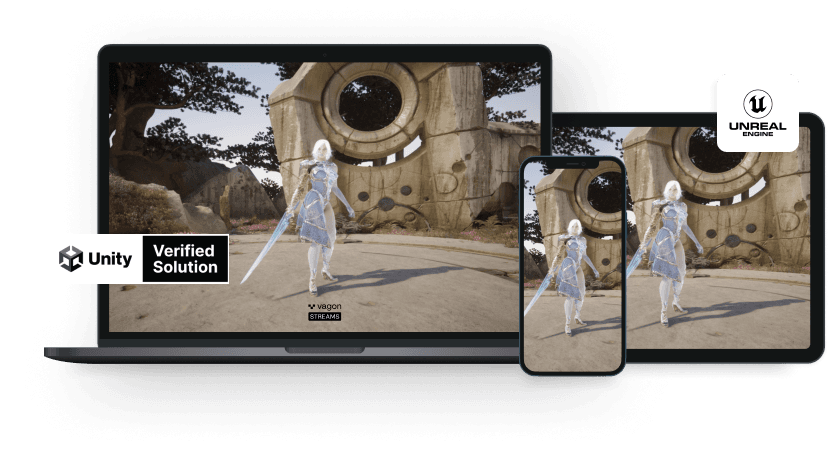
Run your Unity or Unreal Engine application on any device, share with your clients in minutes, with no coding.
Summarize with AI

Ready to focus on your creativity?
Vagon gives you the ability to create & render projects, collaborate, and stream applications with the power of the best hardware.

Vagon Blog
Run heavy applications on any device with
your personal computer on the cloud.
San Francisco, California
Solutions
Vagon Teams
Vagon Streams
Use Cases
Resources
Vagon Blog
How to Run Cinema 4D on Googlebook
How to Run DaVinci Resolve on Googlebook
How to Run Godot on Googlebook: Game Development Guide
How to Run Premiere Pro on Googlebook: Editing Guide
How to Run Revit on Googlebook: Complete BIM Guide
How to Run SOLIDWORKS on Googlebook: Complete CAD Guide
How to Run AutoCAD on Googlebook
How to Run Photoshop on Googlebook
How to Run After Effects on Googlebook
Vagon Blog
Run heavy applications on any device with
your personal computer on the cloud.
San Francisco, California
Solutions
Vagon Teams
Vagon Streams
Use Cases
Resources
Vagon Blog
How to Run Cinema 4D on Googlebook
How to Run DaVinci Resolve on Googlebook
How to Run Godot on Googlebook: Game Development Guide
How to Run Premiere Pro on Googlebook: Editing Guide
How to Run Revit on Googlebook: Complete BIM Guide
How to Run SOLIDWORKS on Googlebook: Complete CAD Guide
How to Run AutoCAD on Googlebook
How to Run Photoshop on Googlebook
How to Run After Effects on Googlebook
Vagon Blog
Run heavy applications on any device with
your personal computer on the cloud.
San Francisco, California
Solutions
Vagon Teams
Vagon Streams
Use Cases
Resources
Vagon Blog