Instant Connection for Pixel Streaming
— New Feature Automated Setup

Top Citrix Alternatives in 2026
Teams & IT
-
Top Citrix Alternatives in 2026
Teams & IT
Top Citrix Alternatives in 2026
Teams & IT
-
Table of Contents
There’s a moment almost every Citrix admin experiences. Usually it happens during a licensing renewal.
You open the quote. You stare at the number. Then someone from finance asks a simple question.
“Wait… why does this cost so much?”
I’ve seen this play out more than once. Not because Citrix is a bad product. It isn’t. Citrix has been one of the pillars of enterprise virtualization for decades. Many organizations built their entire remote infrastructure on it.
But the conversation around Citrix has changed a lot in the past few years.
Part of it is cost. Licensing has become complicated enough that even experienced admins sometimes struggle to explain exactly what their organization is paying for. Another part is architecture. A typical Citrix environment involves multiple components working together: delivery controllers, gateways, storefront servers, databases, and networking layers that all need to behave perfectly.
When everything runs smoothly, it’s impressive.
When it doesn’t… troubleshooting can feel like detective work.

Meanwhile the expectations from users have shifted. Designers want GPU acceleration. Developers want powerful machines on demand. Teams expect to connect from anywhere without complicated VPN setups or latency issues.
And IT departments are under pressure to deliver that experience without spending weeks building infrastructure.
So it’s not surprising that more organizations have started asking a simple question.
If we were starting from scratch today… would we still choose Citrix?
That question is exactly what leads many teams down the path of exploring alternatives.
Why So Many Organizations Are Searching for Citrix Alternatives
Once that initial question comes up, it usually spreads fast across the IT team.
Someone from infrastructure brings it up in a meeting. Another admin mentions they’ve been testing something else in a lab environment. Before long, the team starts seriously evaluating whether their Citrix setup still makes sense.
From what I’ve seen, the motivation usually comes down to a few recurring issues.
Licensing That’s Harder to Explain Every Year
Citrix licensing has never been simple, but over the past decade it has become even harder for teams to navigate.
Different editions unlock different features. Some capabilities require additional subscriptions. Others depend on infrastructure choices or user counts. Even experienced IT managers sometimes have to double check what’s included in their environment and what requires another license tier.
This becomes especially frustrating during renewal cycles.
Finance teams want predictable costs. IT teams want flexibility. Citrix often lands somewhere in the middle, where the pricing model makes sense internally but is difficult to communicate to non technical stakeholders.
And when budgets tighten, complicated licensing quickly becomes a problem.
The Infrastructure Footprint Is Bigger Than People Expect
A lot of people think of Citrix as just “virtual desktops.” In reality, the environment behind those desktops can be fairly involved.
A typical deployment might include delivery controllers, StoreFront servers, gateways, database servers, monitoring tools, and load balancing components. Each of these pieces plays an important role, but they also add operational overhead.
If you’re running a large enterprise environment with dedicated virtualization engineers, that complexity can be manageable.
Smaller teams often struggle with it.
Maintenance windows grow longer. Updates require careful planning. Troubleshooting sometimes means jumping between multiple systems just to figure out where the issue started.
It works. But it’s rarely simple.

User Expectations Have Changed
The users connecting to virtual desktops today are very different from the ones Citrix environments were originally designed for.
A decade ago, many VDI deployments focused on task workers running lightweight applications. Office software, internal tools, maybe a browser or two.
Today’s workloads are heavier.
Designers expect GPU acceleration for 3D applications. Developers run multiple containers, editors, and testing environments. AI researchers need access to powerful GPUs and high memory machines.
Even regular office workers expect near instant responsiveness from anywhere in the world.
Traditional VDI can support these workloads, but doing it well often requires additional infrastructure and careful tuning.
The Cloud Reset Expectations
Cloud platforms changed how teams think about infrastructure.
Instead of planning capacity months in advance, many organizations now expect to spin up resources in minutes. Scaling should happen automatically. Deployments should be repeatable and predictable.
That mindset makes traditional VDI environments feel heavier than they used to.
For some organizations, Citrix still fits perfectly. Large enterprises with established virtualization teams often continue running it successfully.
But for many others, the question becomes harder to ignore.
If we were designing remote access infrastructure today, would we build it the same way?
If you’re currently dealing with laggy Citrix sessions or slow virtual desktops, this guide on how to fix slow performance in Citrix environments explains the most common causes and how teams typically solve them.
What Makes a Good Citrix Alternative?
Once teams decide to evaluate alternatives, the next challenge appears pretty quickly.
Not every remote desktop platform solves the same problem.
Some tools try to replicate the full Citrix architecture. Others focus on simplified application delivery. A few take a completely different approach and skip traditional VDI entirely.
So before comparing products, it helps to step back and define what actually matters.
In my experience, teams that skip this step often end up replacing one complex system with another.
Performance That Matches Real Workloads
Performance is usually the first concern. And for good reason.
A virtual desktop that feels slow will frustrate users immediately. Latency, input lag, and graphical glitches become obvious within minutes. Especially for creative professionals or developers.
This becomes even more important for GPU-heavy workloads.
Applications like Blender, Unreal Engine, AutoCAD, or machine learning frameworks require serious hardware resources. If the platform cannot deliver consistent GPU performance, the experience quickly falls apart.
A strong Citrix alternative should handle demanding workloads without constant tuning from the IT team.

Simplicity of Deployment
One of the most common complaints about traditional VDI environments is the amount of infrastructure involved.
Delivery controllers. Gateways. Databases. Load balancers. Monitoring tools.
Each component adds another layer of configuration and maintenance.
Some modern platforms simplify this dramatically. Others simply recreate the same architecture with slightly different tools.
When evaluating alternatives, it helps to ask a simple question.
How long would it take to get a working environment running from scratch?
Hours is great. Days is manageable. Weeks usually signals trouble.
Predictable Pricing
Budget planning becomes difficult when pricing models are unclear.
Some VDI platforms charge per user. Others charge per machine. Cloud services often add usage-based pricing for compute, storage, and networking.
None of these approaches are inherently wrong. But they should be easy to understand.
If your finance team struggles to predict monthly costs, that platform may create new headaches down the road.
Scalability Without Pain
A good remote workspace platform should grow with the organization.
Sometimes that means supporting thousands of employees across multiple regions. Other times it simply means adding more power for specialized workloads.
Scaling should not require rebuilding the environment every time the team expands.
Ideally, adding capacity feels almost boring.
You need more machines. You add them. The system continues working as expected.
If you’re evaluating AWS-based virtual desktops specifically, this comparison of Amazon WorkSpaces and Citrix walks through how the two platforms perform in real-world environments.
A Smooth Experience for End Users
At the end of the day, users care about one thing.
Can they open their workspace and start working immediately?
Complicated connection steps, VPN requirements, or fragile clients create friction that spreads quickly across an organization. Support tickets follow soon after.
The best platforms minimize that friction. Users log in, access their machine, and focus on their work.
Once teams understand these criteria, comparing Citrix alternatives becomes much easier. And a few names tend to appear in almost every evaluation.

The Most Popular Citrix Alternatives Right Now
Once organizations start comparing options, a few familiar names usually come up first. Most of them try to solve the same core problem Citrix does: delivering desktops or applications remotely while keeping management centralized.
Some do it better in certain situations. Others trade flexibility for simplicity.
None of them are perfect. But they’re the platforms IT teams tend to evaluate when they begin moving away from Citrix.
1. VMware Horizon (Now Omnissa Horizon)
If a company is already deep in the VMware ecosystem, Horizon is often the first alternative they explore.
VMware has been competing with Citrix in the VDI space for years. Many enterprises already run VMware vSphere for virtualization, which makes Horizon a natural extension of their existing infrastructure.
The platform is built around VMware’s Blast Extreme protocol, which is designed to deliver responsive desktops even over less-than-perfect network connections. In well configured environments, the performance can be excellent.
Another advantage is integration. Horizon works smoothly with VMware tools for networking, storage, and identity management. For companies already invested in VMware infrastructure, this can simplify operations.

But Horizon is not necessarily a simpler solution.
The architecture still involves multiple components, careful planning, and experienced administrators. In many ways, organizations switching from Citrix to Horizon are trading one mature enterprise VDI platform for another.
That works well for large enterprises with dedicated virtualization teams. Smaller organizations sometimes find the complexity familiar… and not always in a good way.
2. Microsoft Azure Virtual Desktop
Microsoft took a different route with Azure Virtual Desktop, usually shortened to AVD.
Instead of requiring companies to run most of the infrastructure themselves, AVD moves much of the control plane into Azure. IT teams still manage the virtual machines, but Microsoft handles several of the underlying services that traditional VDI platforms require.
For organizations already running Microsoft 365 and Azure, this integration can be very appealing.
User authentication connects directly with Azure Active Directory. Policies can be managed through familiar Microsoft tools. Scaling environments becomes easier because new machines can be provisioned quickly inside Azure.
AVD also benefits from Microsoft’s global cloud infrastructure, which helps reduce latency for distributed teams.
The tradeoff is operational familiarity.
Teams need solid Azure knowledge to manage costs, networking, and scaling properly. GPU workloads can also become expensive depending on the machine types being used.
Still, for organizations committed to the Microsoft ecosystem, Azure Virtual Desktop has become one of the most widely adopted Citrix alternatives in recent years.
3. Amazon WorkSpaces
Organizations heavily invested in AWS often gravitate toward Amazon WorkSpaces.
The idea is fairly straightforward. Instead of building a full VDI environment, companies can launch managed virtual desktops directly from AWS. Users connect through a client application and access their dedicated workspace.
Deployment is relatively quick compared to traditional VDI stacks. Administrators can spin up desktops, assign them to users, and scale capacity through AWS management tools.
Pricing is also flexible. Some companies use monthly subscriptions for persistent desktops. Others choose hourly billing models for temporary environments.

This flexibility makes WorkSpaces attractive for teams that need temporary computing environments or seasonal scaling.
But it also comes with limitations.
Customization options are more restricted compared to traditional VDI platforms. Some advanced enterprise features available in Citrix environments require additional AWS services or workarounds.
For AWS focused organizations, those tradeoffs often feel acceptable. For others, WorkSpaces can feel slightly constrained.
If you’re still mapping out the landscape, this guide to the best virtual desktop infrastructure providers breaks down the main platforms organizations evaluate today.
4. Parallels Remote Application Server (RAS)
Parallels RAS often appears in conversations as the “simpler Citrix alternative.”
The platform focuses heavily on ease of deployment and straightforward management. Many IT teams report that they can get a working environment running much faster compared to larger VDI systems.
Parallels RAS supports both virtual desktops and application publishing, allowing organizations to deliver specific applications without providing full desktop environments.
Cost is another area where Parallels tends to stand out. Licensing is generally easier to understand, which appeals to companies frustrated by complex pricing models.
Of course, simplicity can come with tradeoffs.
The ecosystem around Parallels RAS is smaller than those surrounding Citrix, VMware, or Microsoft. Large enterprises sometimes prefer platforms with broader integrations and long established enterprise tooling.

For small to mid sized organizations, though, Parallels RAS can feel refreshingly straightforward.
These platforms represent the most common paths organizations take when replacing Citrix. But there’s an interesting pattern hiding beneath all of them.
Most of these alternatives are still built on the same fundamental idea.
A full VDI environment that delivers remote desktops through centralized infrastructure.
And that raises another question many teams eventually start asking.
If your team already uses VMware infrastructure, it’s worth looking at how VMware Horizon compares directly with Citrix before making a decision.
The Problem With Most Citrix Alternatives
After going through a few platform demos, many IT teams notice something interesting.
The tools may have different logos. The dashboards look different. Licensing models change a bit.
But under the surface, most Citrix alternatives follow the same basic blueprint.
You still build a VDI environment.
You still manage virtual machines.
You still maintain infrastructure layers that deliver those desktops to users.
In other words, you're often replacing Citrix with… another VDI stack.
For some organizations, that’s perfectly fine. Large enterprises often have entire teams dedicated to virtualization and infrastructure management. Running Horizon or Azure Virtual Desktop fits naturally into that model.
But not every organization wants to keep managing that level of complexity.
Many teams just need to give people access to powerful machines.

Designers need GPUs for rendering. Developers need isolated environments for testing. AI engineers need high performance hardware for training models. Architects need to run heavy 3D software.
And none of those teams necessarily care about VDI architecture.
They care about getting a machine that works.
This is where the conversation often shifts. Instead of asking which VDI platform should replace Citrix, teams begin asking a slightly different question.
Do we actually need full virtual desktops for everyone?
Or do we simply need powerful workstations that can be accessed from anywhere?
That shift in thinking is slowly changing how organizations approach remote computing. And it’s opening the door to a different kind of solution entirely.
If you’re researching enterprise VDI options more broadly, some organizations also compare Citrix with Nutanix to understand how their infrastructure models differ.
A New Direction: Cloud Workstations Instead of Traditional VDI
Over the past few years, another model has been quietly gaining traction.
Instead of building large VDI environments, some teams are moving toward cloud workstations.
The idea is simple.
Rather than maintaining persistent virtual desktops for every employee, organizations spin up powerful machines in the cloud only when they’re needed. Those machines can be accessed through a browser or lightweight client, used for a task, and shut down afterward.
No delivery controllers.
No complex desktop pools.
No infrastructure planning months in advance.
Just machines available on demand.
This approach works especially well for workloads that require significant computing power.
Think about teams working with 3D rendering, simulation, game engines, AI models, or high resolution video editing. These workloads often require GPUs and large amounts of memory. Running them on local laptops can be frustrating or simply impossible.
Cloud workstations solve that problem by providing high performance hardware remotely.

A designer working from a lightweight laptop can connect to a GPU powered workstation in seconds. A developer can launch a powerful environment for testing without installing anything locally. Teams distributed across different regions can access the same computing resources without shipping expensive hardware around the world.
Another advantage is flexibility.
Traditional VDI environments are usually designed around persistent desktops assigned to specific users. Cloud workstations can be much more dynamic. Machines can be created, shared, scaled up, or shut down depending on what the team actually needs.
For organizations that prioritize agility, that difference matters a lot.
Of course, cloud workstations are not a universal replacement for every VDI deployment. Large enterprises with strict compliance requirements or deeply integrated infrastructure may still rely on traditional VDI platforms.
But for many modern teams, especially those working with demanding applications, this newer model is starting to feel like a better fit.
And this is exactly where platforms like Vagon Teams begin to enter the conversation.
Where Vagon Teams Fits Into This Picture
When teams start looking beyond traditional VDI, the conversation usually shifts from infrastructure to experience.
Instead of asking, “Which platform replaces Citrix?” the question becomes much simpler.
“How can we give people powerful machines without all the overhead?”
That’s where platforms like Vagon Teams approach the problem differently.
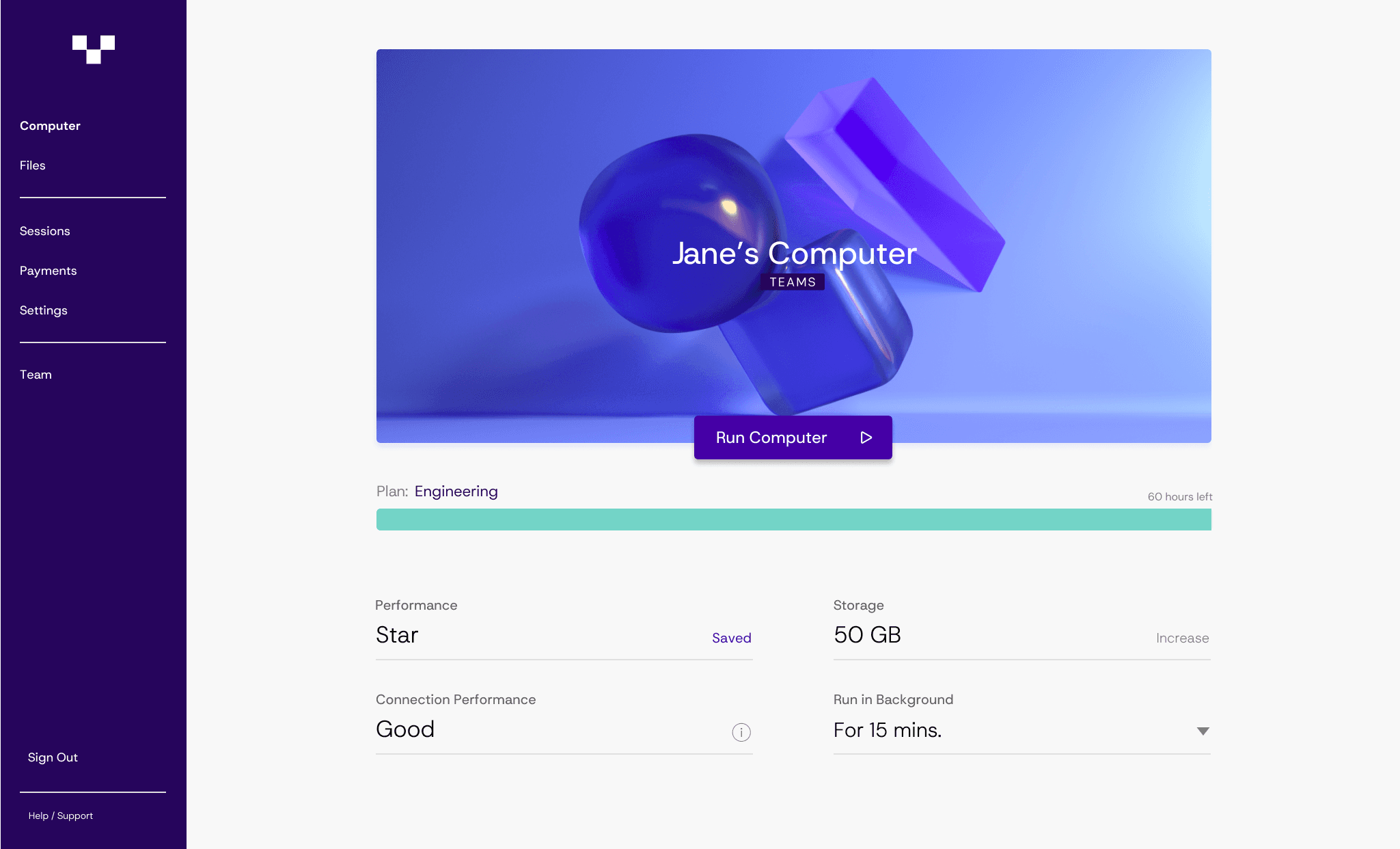
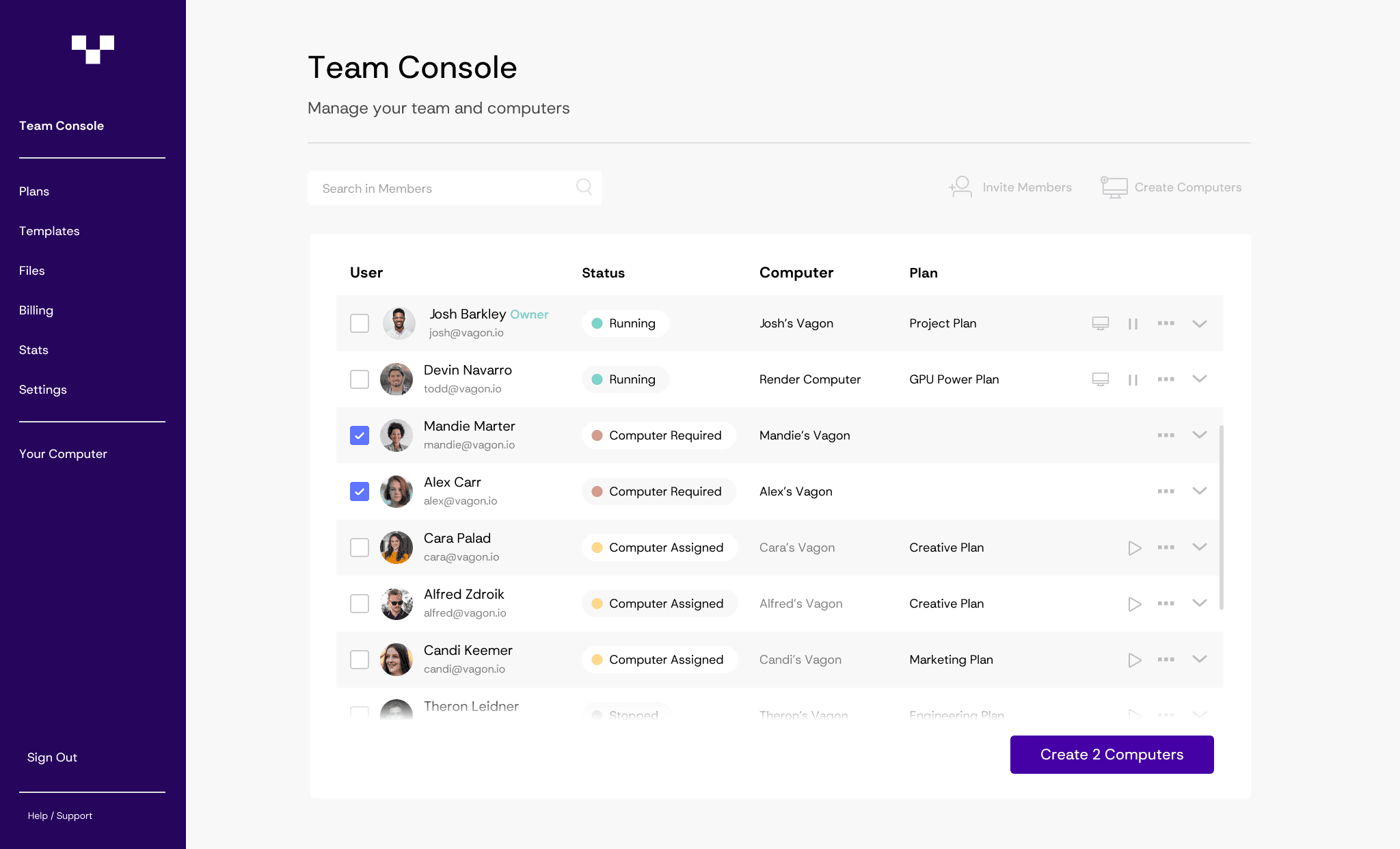
Rather than building another VDI stack with controllers, gateways, and desktop pools, Vagon focuses on something much more straightforward. High performance cloud machines that teams can access instantly.
In practice, the workflow feels very different from a typical virtual desktop environment.
A team can launch powerful GPU machines in minutes. Users connect through a browser. No complicated client setup. No long provisioning process. The machine is simply there, ready to run demanding applications.
This model works particularly well for teams dealing with heavy workloads.
Think about a 3D artist rendering scenes in Blender. Or an architecture team working inside Unreal Engine. Or an AI engineer experimenting with new models that require serious GPU power.
Instead of trying to run those workloads on local machines, or building a large VDI infrastructure to support them, the team can spin up a high performance workstation when needed.
Another thing I’ve noticed is how much easier collaboration becomes in this setup.
With traditional workstations, sharing environments often means transferring files, synchronizing project folders, or configuring access permissions across multiple systems.
With cloud machines, the environment itself can be shared. Teammates can access the same workspace without worrying about local hardware differences.
For distributed teams, that removes a surprising amount of friction.
And from an infrastructure perspective, the setup tends to be dramatically simpler.
There’s no need to maintain a full virtualization stack. No complex network configuration. No long planning cycles before adding capacity.
If a team needs more machines, they launch more machines.
That simplicity is part of why cloud workstation platforms have been gaining attention recently. Especially among organizations that want powerful computing resources without the operational weight of traditional VDI systems.
When Vagon Teams Makes More Sense Than Traditional VDI
Cloud workstations are not meant to replace every VDI deployment. Some enterprise environments still require persistent desktops, deep policy control, or legacy application support.
But there are many situations where a cloud workstation approach simply fits better.
Creative teams are a good example.
Studios working with tools like Unreal Engine, Blender, After Effects, or Cinema 4D often need serious GPU power. Equipping every employee with high end workstations can be expensive and difficult to scale. Cloud machines allow those teams to access powerful hardware from anywhere without constantly upgrading local devices.
AI and machine learning teams face a similar challenge.
Training and testing models requires GPUs that many organizations cannot justify purchasing for every engineer. Cloud workstations allow those resources to be used only when needed, which can be far more practical.

Architecture and visualization firms also benefit from this model. Large design files, heavy rendering tasks, and collaborative workflows often work better when the computing power lives in the cloud instead of individual laptops.
Even small distributed teams find value here.
Instead of shipping expensive hardware to contractors or remote employees, organizations can provide access to secure cloud machines that run the required software environments.
In those cases, the goal is not to replicate Citrix.
It’s to give people the computing power they need with far less infrastructure standing in the way.
If you’re exploring cloud-hosted desktop solutions instead of traditional infrastructure, this overview of Desktop-as-a-Service platforms explains how modern DaaS environments work.
Final Thoughts
Citrix helped define how organizations delivered remote desktops for decades. In many enterprise environments, it still plays an important role.
But the way teams work has changed.
Workloads have become heavier. Teams are more distributed. And organizations increasingly expect infrastructure to scale quickly without complicated deployments.
That’s why more companies are exploring alternatives.
Some replace Citrix with another VDI platform like VMware Horizon or Azure Virtual Desktop. For certain environments, that approach works perfectly well.
Others are stepping back and rethinking the entire model.
Instead of managing complex desktop infrastructure, they’re focusing on giving teams access to powerful machines whenever they need them.
Sometimes the best alternative to Citrix isn’t another VDI stack.
Sometimes it’s a simpler way to work.
Frequently Asked Questions
1. What is the best Citrix alternative?
It depends on your environment. Large enterprises often look at VMware Horizon or Azure Virtual Desktop because they integrate well with existing infrastructure. AWS-heavy teams may prefer Amazon WorkSpaces. Some organizations skip traditional VDI entirely and use cloud workstations instead.
2. Why are companies looking for Citrix alternatives?
Mostly because of complexity and cost. Citrix environments can involve multiple infrastructure components and licensing tiers. As teams move toward cloud services, many prefer platforms that are faster to deploy and easier to manage.
3. Is Azure Virtual Desktop a replacement for Citrix?
In many cases, yes. Azure Virtual Desktop provides remote desktops through Microsoft Azure and integrates tightly with Microsoft 365 and Azure Active Directory. It’s a common choice for organizations already using the Microsoft ecosystem.
4. What is the difference between VDI and cloud workstations?
VDI provides persistent virtual desktops managed by IT. Cloud workstations allow teams to launch powerful machines on demand, often with GPU support. They are usually easier to scale and require less infrastructure.
5. When does Vagon Teams make sense?
Vagon Teams works well for teams that need high-performance machines without managing a VDI stack. Creative teams, AI developers, and 3D designers often use it to access powerful GPU machines directly from their browser.
There’s a moment almost every Citrix admin experiences. Usually it happens during a licensing renewal.
You open the quote. You stare at the number. Then someone from finance asks a simple question.
“Wait… why does this cost so much?”
I’ve seen this play out more than once. Not because Citrix is a bad product. It isn’t. Citrix has been one of the pillars of enterprise virtualization for decades. Many organizations built their entire remote infrastructure on it.
But the conversation around Citrix has changed a lot in the past few years.
Part of it is cost. Licensing has become complicated enough that even experienced admins sometimes struggle to explain exactly what their organization is paying for. Another part is architecture. A typical Citrix environment involves multiple components working together: delivery controllers, gateways, storefront servers, databases, and networking layers that all need to behave perfectly.
When everything runs smoothly, it’s impressive.
When it doesn’t… troubleshooting can feel like detective work.
Meanwhile the expectations from users have shifted. Designers want GPU acceleration. Developers want powerful machines on demand. Teams expect to connect from anywhere without complicated VPN setups or latency issues.
And IT departments are under pressure to deliver that experience without spending weeks building infrastructure.
So it’s not surprising that more organizations have started asking a simple question.
If we were starting from scratch today… would we still choose Citrix?
That question is exactly what leads many teams down the path of exploring alternatives.
Why So Many Organizations Are Searching for Citrix Alternatives
Once that initial question comes up, it usually spreads fast across the IT team.
Someone from infrastructure brings it up in a meeting. Another admin mentions they’ve been testing something else in a lab environment. Before long, the team starts seriously evaluating whether their Citrix setup still makes sense.
From what I’ve seen, the motivation usually comes down to a few recurring issues.
Licensing That’s Harder to Explain Every Year
Citrix licensing has never been simple, but over the past decade it has become even harder for teams to navigate.
Different editions unlock different features. Some capabilities require additional subscriptions. Others depend on infrastructure choices or user counts. Even experienced IT managers sometimes have to double check what’s included in their environment and what requires another license tier.
This becomes especially frustrating during renewal cycles.
Finance teams want predictable costs. IT teams want flexibility. Citrix often lands somewhere in the middle, where the pricing model makes sense internally but is difficult to communicate to non technical stakeholders.
And when budgets tighten, complicated licensing quickly becomes a problem.
The Infrastructure Footprint Is Bigger Than People Expect
A lot of people think of Citrix as just “virtual desktops.” In reality, the environment behind those desktops can be fairly involved.
A typical deployment might include delivery controllers, StoreFront servers, gateways, database servers, monitoring tools, and load balancing components. Each of these pieces plays an important role, but they also add operational overhead.
If you’re running a large enterprise environment with dedicated virtualization engineers, that complexity can be manageable.
Smaller teams often struggle with it.
Maintenance windows grow longer. Updates require careful planning. Troubleshooting sometimes means jumping between multiple systems just to figure out where the issue started.
It works. But it’s rarely simple.
User Expectations Have Changed
The users connecting to virtual desktops today are very different from the ones Citrix environments were originally designed for.
A decade ago, many VDI deployments focused on task workers running lightweight applications. Office software, internal tools, maybe a browser or two.
Today’s workloads are heavier.
Designers expect GPU acceleration for 3D applications. Developers run multiple containers, editors, and testing environments. AI researchers need access to powerful GPUs and high memory machines.
Even regular office workers expect near instant responsiveness from anywhere in the world.
Traditional VDI can support these workloads, but doing it well often requires additional infrastructure and careful tuning.
The Cloud Reset Expectations
Cloud platforms changed how teams think about infrastructure.
Instead of planning capacity months in advance, many organizations now expect to spin up resources in minutes. Scaling should happen automatically. Deployments should be repeatable and predictable.
That mindset makes traditional VDI environments feel heavier than they used to.
For some organizations, Citrix still fits perfectly. Large enterprises with established virtualization teams often continue running it successfully.
But for many others, the question becomes harder to ignore.
If we were designing remote access infrastructure today, would we build it the same way?
If you’re currently dealing with laggy Citrix sessions or slow virtual desktops, this guide on how to fix slow performance in Citrix environments explains the most common causes and how teams typically solve them.
What Makes a Good Citrix Alternative?
Once teams decide to evaluate alternatives, the next challenge appears pretty quickly.
Not every remote desktop platform solves the same problem.
Some tools try to replicate the full Citrix architecture. Others focus on simplified application delivery. A few take a completely different approach and skip traditional VDI entirely.
So before comparing products, it helps to step back and define what actually matters.
In my experience, teams that skip this step often end up replacing one complex system with another.
Performance That Matches Real Workloads
Performance is usually the first concern. And for good reason.
A virtual desktop that feels slow will frustrate users immediately. Latency, input lag, and graphical glitches become obvious within minutes. Especially for creative professionals or developers.
This becomes even more important for GPU-heavy workloads.
Applications like Blender, Unreal Engine, AutoCAD, or machine learning frameworks require serious hardware resources. If the platform cannot deliver consistent GPU performance, the experience quickly falls apart.
A strong Citrix alternative should handle demanding workloads without constant tuning from the IT team.
Simplicity of Deployment
One of the most common complaints about traditional VDI environments is the amount of infrastructure involved.
Delivery controllers. Gateways. Databases. Load balancers. Monitoring tools.
Each component adds another layer of configuration and maintenance.
Some modern platforms simplify this dramatically. Others simply recreate the same architecture with slightly different tools.
When evaluating alternatives, it helps to ask a simple question.
How long would it take to get a working environment running from scratch?
Hours is great. Days is manageable. Weeks usually signals trouble.
Predictable Pricing
Budget planning becomes difficult when pricing models are unclear.
Some VDI platforms charge per user. Others charge per machine. Cloud services often add usage-based pricing for compute, storage, and networking.
None of these approaches are inherently wrong. But they should be easy to understand.
If your finance team struggles to predict monthly costs, that platform may create new headaches down the road.
Scalability Without Pain
A good remote workspace platform should grow with the organization.
Sometimes that means supporting thousands of employees across multiple regions. Other times it simply means adding more power for specialized workloads.
Scaling should not require rebuilding the environment every time the team expands.
Ideally, adding capacity feels almost boring.
You need more machines. You add them. The system continues working as expected.
If you’re evaluating AWS-based virtual desktops specifically, this comparison of Amazon WorkSpaces and Citrix walks through how the two platforms perform in real-world environments.
A Smooth Experience for End Users
At the end of the day, users care about one thing.
Can they open their workspace and start working immediately?
Complicated connection steps, VPN requirements, or fragile clients create friction that spreads quickly across an organization. Support tickets follow soon after.
The best platforms minimize that friction. Users log in, access their machine, and focus on their work.
Once teams understand these criteria, comparing Citrix alternatives becomes much easier. And a few names tend to appear in almost every evaluation.
The Most Popular Citrix Alternatives Right Now
Once organizations start comparing options, a few familiar names usually come up first. Most of them try to solve the same core problem Citrix does: delivering desktops or applications remotely while keeping management centralized.
Some do it better in certain situations. Others trade flexibility for simplicity.
None of them are perfect. But they’re the platforms IT teams tend to evaluate when they begin moving away from Citrix.
1. VMware Horizon (Now Omnissa Horizon)
If a company is already deep in the VMware ecosystem, Horizon is often the first alternative they explore.
VMware has been competing with Citrix in the VDI space for years. Many enterprises already run VMware vSphere for virtualization, which makes Horizon a natural extension of their existing infrastructure.
The platform is built around VMware’s Blast Extreme protocol, which is designed to deliver responsive desktops even over less-than-perfect network connections. In well configured environments, the performance can be excellent.
Another advantage is integration. Horizon works smoothly with VMware tools for networking, storage, and identity management. For companies already invested in VMware infrastructure, this can simplify operations.
But Horizon is not necessarily a simpler solution.
The architecture still involves multiple components, careful planning, and experienced administrators. In many ways, organizations switching from Citrix to Horizon are trading one mature enterprise VDI platform for another.
That works well for large enterprises with dedicated virtualization teams. Smaller organizations sometimes find the complexity familiar… and not always in a good way.
2. Microsoft Azure Virtual Desktop
Microsoft took a different route with Azure Virtual Desktop, usually shortened to AVD.
Instead of requiring companies to run most of the infrastructure themselves, AVD moves much of the control plane into Azure. IT teams still manage the virtual machines, but Microsoft handles several of the underlying services that traditional VDI platforms require.
For organizations already running Microsoft 365 and Azure, this integration can be very appealing.
User authentication connects directly with Azure Active Directory. Policies can be managed through familiar Microsoft tools. Scaling environments becomes easier because new machines can be provisioned quickly inside Azure.
AVD also benefits from Microsoft’s global cloud infrastructure, which helps reduce latency for distributed teams.
The tradeoff is operational familiarity.
Teams need solid Azure knowledge to manage costs, networking, and scaling properly. GPU workloads can also become expensive depending on the machine types being used.
Still, for organizations committed to the Microsoft ecosystem, Azure Virtual Desktop has become one of the most widely adopted Citrix alternatives in recent years.
3. Amazon WorkSpaces
Organizations heavily invested in AWS often gravitate toward Amazon WorkSpaces.
The idea is fairly straightforward. Instead of building a full VDI environment, companies can launch managed virtual desktops directly from AWS. Users connect through a client application and access their dedicated workspace.
Deployment is relatively quick compared to traditional VDI stacks. Administrators can spin up desktops, assign them to users, and scale capacity through AWS management tools.
Pricing is also flexible. Some companies use monthly subscriptions for persistent desktops. Others choose hourly billing models for temporary environments.
This flexibility makes WorkSpaces attractive for teams that need temporary computing environments or seasonal scaling.
But it also comes with limitations.
Customization options are more restricted compared to traditional VDI platforms. Some advanced enterprise features available in Citrix environments require additional AWS services or workarounds.
For AWS focused organizations, those tradeoffs often feel acceptable. For others, WorkSpaces can feel slightly constrained.
If you’re still mapping out the landscape, this guide to the best virtual desktop infrastructure providers breaks down the main platforms organizations evaluate today.
4. Parallels Remote Application Server (RAS)
Parallels RAS often appears in conversations as the “simpler Citrix alternative.”
The platform focuses heavily on ease of deployment and straightforward management. Many IT teams report that they can get a working environment running much faster compared to larger VDI systems.
Parallels RAS supports both virtual desktops and application publishing, allowing organizations to deliver specific applications without providing full desktop environments.
Cost is another area where Parallels tends to stand out. Licensing is generally easier to understand, which appeals to companies frustrated by complex pricing models.
Of course, simplicity can come with tradeoffs.
The ecosystem around Parallels RAS is smaller than those surrounding Citrix, VMware, or Microsoft. Large enterprises sometimes prefer platforms with broader integrations and long established enterprise tooling.
For small to mid sized organizations, though, Parallels RAS can feel refreshingly straightforward.
These platforms represent the most common paths organizations take when replacing Citrix. But there’s an interesting pattern hiding beneath all of them.
Most of these alternatives are still built on the same fundamental idea.
A full VDI environment that delivers remote desktops through centralized infrastructure.
And that raises another question many teams eventually start asking.
If your team already uses VMware infrastructure, it’s worth looking at how VMware Horizon compares directly with Citrix before making a decision.
The Problem With Most Citrix Alternatives
After going through a few platform demos, many IT teams notice something interesting.
The tools may have different logos. The dashboards look different. Licensing models change a bit.
But under the surface, most Citrix alternatives follow the same basic blueprint.
You still build a VDI environment.
You still manage virtual machines.
You still maintain infrastructure layers that deliver those desktops to users.
In other words, you're often replacing Citrix with… another VDI stack.
For some organizations, that’s perfectly fine. Large enterprises often have entire teams dedicated to virtualization and infrastructure management. Running Horizon or Azure Virtual Desktop fits naturally into that model.
But not every organization wants to keep managing that level of complexity.
Many teams just need to give people access to powerful machines.
Designers need GPUs for rendering. Developers need isolated environments for testing. AI engineers need high performance hardware for training models. Architects need to run heavy 3D software.
And none of those teams necessarily care about VDI architecture.
They care about getting a machine that works.
This is where the conversation often shifts. Instead of asking which VDI platform should replace Citrix, teams begin asking a slightly different question.
Do we actually need full virtual desktops for everyone?
Or do we simply need powerful workstations that can be accessed from anywhere?
That shift in thinking is slowly changing how organizations approach remote computing. And it’s opening the door to a different kind of solution entirely.
If you’re researching enterprise VDI options more broadly, some organizations also compare Citrix with Nutanix to understand how their infrastructure models differ.
A New Direction: Cloud Workstations Instead of Traditional VDI
Over the past few years, another model has been quietly gaining traction.
Instead of building large VDI environments, some teams are moving toward cloud workstations.
The idea is simple.
Rather than maintaining persistent virtual desktops for every employee, organizations spin up powerful machines in the cloud only when they’re needed. Those machines can be accessed through a browser or lightweight client, used for a task, and shut down afterward.
No delivery controllers.
No complex desktop pools.
No infrastructure planning months in advance.
Just machines available on demand.
This approach works especially well for workloads that require significant computing power.
Think about teams working with 3D rendering, simulation, game engines, AI models, or high resolution video editing. These workloads often require GPUs and large amounts of memory. Running them on local laptops can be frustrating or simply impossible.
Cloud workstations solve that problem by providing high performance hardware remotely.
A designer working from a lightweight laptop can connect to a GPU powered workstation in seconds. A developer can launch a powerful environment for testing without installing anything locally. Teams distributed across different regions can access the same computing resources without shipping expensive hardware around the world.
Another advantage is flexibility.
Traditional VDI environments are usually designed around persistent desktops assigned to specific users. Cloud workstations can be much more dynamic. Machines can be created, shared, scaled up, or shut down depending on what the team actually needs.
For organizations that prioritize agility, that difference matters a lot.
Of course, cloud workstations are not a universal replacement for every VDI deployment. Large enterprises with strict compliance requirements or deeply integrated infrastructure may still rely on traditional VDI platforms.
But for many modern teams, especially those working with demanding applications, this newer model is starting to feel like a better fit.
And this is exactly where platforms like Vagon Teams begin to enter the conversation.
Where Vagon Teams Fits Into This Picture
When teams start looking beyond traditional VDI, the conversation usually shifts from infrastructure to experience.
Instead of asking, “Which platform replaces Citrix?” the question becomes much simpler.
“How can we give people powerful machines without all the overhead?”
That’s where platforms like Vagon Teams approach the problem differently.
Rather than building another VDI stack with controllers, gateways, and desktop pools, Vagon focuses on something much more straightforward. High performance cloud machines that teams can access instantly.
In practice, the workflow feels very different from a typical virtual desktop environment.
A team can launch powerful GPU machines in minutes. Users connect through a browser. No complicated client setup. No long provisioning process. The machine is simply there, ready to run demanding applications.
This model works particularly well for teams dealing with heavy workloads.
Think about a 3D artist rendering scenes in Blender. Or an architecture team working inside Unreal Engine. Or an AI engineer experimenting with new models that require serious GPU power.
Instead of trying to run those workloads on local machines, or building a large VDI infrastructure to support them, the team can spin up a high performance workstation when needed.
Another thing I’ve noticed is how much easier collaboration becomes in this setup.
With traditional workstations, sharing environments often means transferring files, synchronizing project folders, or configuring access permissions across multiple systems.
With cloud machines, the environment itself can be shared. Teammates can access the same workspace without worrying about local hardware differences.
For distributed teams, that removes a surprising amount of friction.
And from an infrastructure perspective, the setup tends to be dramatically simpler.
There’s no need to maintain a full virtualization stack. No complex network configuration. No long planning cycles before adding capacity.
If a team needs more machines, they launch more machines.
That simplicity is part of why cloud workstation platforms have been gaining attention recently. Especially among organizations that want powerful computing resources without the operational weight of traditional VDI systems.
When Vagon Teams Makes More Sense Than Traditional VDI
Cloud workstations are not meant to replace every VDI deployment. Some enterprise environments still require persistent desktops, deep policy control, or legacy application support.
But there are many situations where a cloud workstation approach simply fits better.
Creative teams are a good example.
Studios working with tools like Unreal Engine, Blender, After Effects, or Cinema 4D often need serious GPU power. Equipping every employee with high end workstations can be expensive and difficult to scale. Cloud machines allow those teams to access powerful hardware from anywhere without constantly upgrading local devices.
AI and machine learning teams face a similar challenge.
Training and testing models requires GPUs that many organizations cannot justify purchasing for every engineer. Cloud workstations allow those resources to be used only when needed, which can be far more practical.
Architecture and visualization firms also benefit from this model. Large design files, heavy rendering tasks, and collaborative workflows often work better when the computing power lives in the cloud instead of individual laptops.
Even small distributed teams find value here.
Instead of shipping expensive hardware to contractors or remote employees, organizations can provide access to secure cloud machines that run the required software environments.
In those cases, the goal is not to replicate Citrix.
It’s to give people the computing power they need with far less infrastructure standing in the way.
If you’re exploring cloud-hosted desktop solutions instead of traditional infrastructure, this overview of Desktop-as-a-Service platforms explains how modern DaaS environments work.
Final Thoughts
Citrix helped define how organizations delivered remote desktops for decades. In many enterprise environments, it still plays an important role.
But the way teams work has changed.
Workloads have become heavier. Teams are more distributed. And organizations increasingly expect infrastructure to scale quickly without complicated deployments.
That’s why more companies are exploring alternatives.
Some replace Citrix with another VDI platform like VMware Horizon or Azure Virtual Desktop. For certain environments, that approach works perfectly well.
Others are stepping back and rethinking the entire model.
Instead of managing complex desktop infrastructure, they’re focusing on giving teams access to powerful machines whenever they need them.
Sometimes the best alternative to Citrix isn’t another VDI stack.
Sometimes it’s a simpler way to work.
Frequently Asked Questions
1. What is the best Citrix alternative?
It depends on your environment. Large enterprises often look at VMware Horizon or Azure Virtual Desktop because they integrate well with existing infrastructure. AWS-heavy teams may prefer Amazon WorkSpaces. Some organizations skip traditional VDI entirely and use cloud workstations instead.
2. Why are companies looking for Citrix alternatives?
Mostly because of complexity and cost. Citrix environments can involve multiple infrastructure components and licensing tiers. As teams move toward cloud services, many prefer platforms that are faster to deploy and easier to manage.
3. Is Azure Virtual Desktop a replacement for Citrix?
In many cases, yes. Azure Virtual Desktop provides remote desktops through Microsoft Azure and integrates tightly with Microsoft 365 and Azure Active Directory. It’s a common choice for organizations already using the Microsoft ecosystem.
4. What is the difference between VDI and cloud workstations?
VDI provides persistent virtual desktops managed by IT. Cloud workstations allow teams to launch powerful machines on demand, often with GPU support. They are usually easier to scale and require less infrastructure.
5. When does Vagon Teams make sense?
Vagon Teams works well for teams that need high-performance machines without managing a VDI stack. Creative teams, AI developers, and 3D designers often use it to access powerful GPU machines directly from their browser.
Scalable Remote Desktop for your Team
Create cloud computers for your Team, manage their access & permissions in real-time. Start in minutes & scale.

Trial includes 1 hour usage + 7 days of
storage for first 2 seats.
Scalable Remote Desktop for your Team
Create cloud computers for your Team, manage their access & permissions in real-time. Start in minutes & scale.
Trial includes 1 hour usage + 7 days of
storage for first 2 seats.
Summarize with AI

Ready to focus on your creativity?
Vagon gives you the ability to create & render projects, collaborate, and stream applications with the power of the best hardware.

Vagon Blog
Run heavy applications on any device with
your personal computer on the cloud.
San Francisco, California
Solutions
Vagon Teams
Vagon Streams
Use Cases
Resources
Vagon Blog
How to Run Blender on Googlebook
How to Run After Effects on Googlebook
How to Use SketchUp With Codex: MCP and Computer Use
How to Use SketchUp With Claude: MCP and Computer Use
How to Use ComfyUI With Codex: MCP and Computer Use
How to Use Godot With Codex: MCP & Computer Use Guide
How to Use Houdini With Codex: MCP, Computer Use & RBD
How to Use Cinema 4D With Codex: MCP & Computer Use
How to Use Higgsfield With Codex: MCP & Computer Use
Vagon Blog
Run heavy applications on any device with
your personal computer on the cloud.
San Francisco, California
Solutions
Vagon Teams
Vagon Streams
Use Cases
Resources
Vagon Blog
How to Run Blender on Googlebook
How to Run After Effects on Googlebook
How to Use SketchUp With Codex: MCP and Computer Use
How to Use SketchUp With Claude: MCP and Computer Use
How to Use ComfyUI With Codex: MCP and Computer Use
How to Use Godot With Codex: MCP & Computer Use Guide
How to Use Houdini With Codex: MCP, Computer Use & RBD
How to Use Cinema 4D With Codex: MCP & Computer Use
How to Use Higgsfield With Codex: MCP & Computer Use
Vagon Blog
Run heavy applications on any device with
your personal computer on the cloud.
San Francisco, California
Solutions
Vagon Teams
Vagon Streams
Use Cases
Resources
Vagon Blog